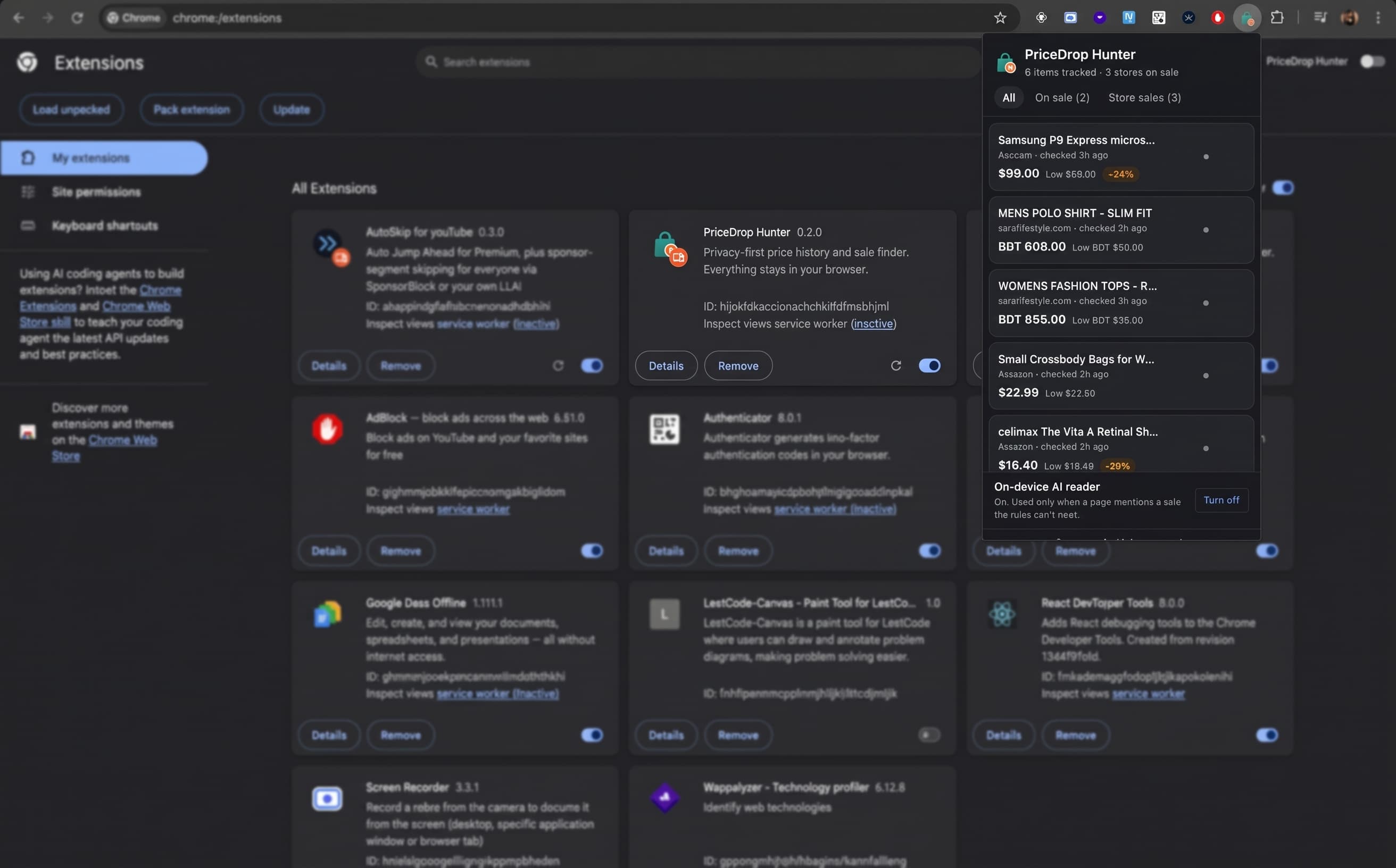
Status: Working and used daily, but not published on the Chrome Web Store yet. You can load it from the GitHub repo as an unpacked extension. The landing page explains how it works.
Who did what: idea generation and organizing by me; coding execution by Claude Code.
The Problem
Online shopping in Bangladesh has a quirk. Fashion brands run big sales all the time: "Flat 50% off", "Upto 70% off", "Mega Sale till 10th November". But you only find out if you happen to visit the right website or scroll past the right Facebook post on the right day.
Some brands put the sale on their website. Some only put it in a banner image. Some don't put it on their website at all and only post it on Facebook.
I wanted a tool that answers one question:
"I'm looking for a gown / panjabi / handbag right now. Is anyone having a sale on that?"
That became PriceDrop Hunter, a Chrome extension that:
- Tracks prices of products you look at and tells you whether today's price is the lowest it has seen.
- Notices store-wide sales on sale pages, banners and Facebook posts.
- Suggests other stores with a matching sale while you search or shop anywhere else.
The Rules I Set
- Privacy first. No server, no account, no analytics. Everything lives in
chrome.storage.localon the user's computer. - No setup. No list of stores to type in. Visit a shop and it just works.
- Manifest V3, plain JavaScript. No frameworks, no remotely loaded code.
With no server, nothing can crawl the web for sales. The extension only learns from pages the user actually visits, so the challenge became: get as much as possible out of every page the user opens.
How It Works
 Any shop page ──► content.js ──┐
                                 ├──► chrome.storage.local ──► popup (dashboard)
 Facebook page ──► facebook.js ─┘            │
                                              └──► "On sale on other sites" card
 Hard cases ──► background.js ──► Chrome's built-in AI (runs on this computer)
When you search for something (on Google, Amazon, Daraz, anywhere), the extension compares the search words with the sales it has saved. If there's a match, a small card appears:
🏷️ On sale on other sites for "panjabi" Artisan Outfitters · 50% off · until 10 Nov SaRa Lifestyle · up to 70% off
The Hard Parts
1. Reading a price is harder than it looks
$1,299.99, 1.299,99 €, Rs. 1,299, ৳ 2,450, CHF 1'299.50. The parser works out the decimal mark from where it appears and converts Bangla digits (৫০ → 50). One bug: "৳ 5440 + VAT" made the currency "VAT". Now only real currency codes are accepted.
2. Finding product pages without a store list
Read schema.org JSON-LD first, then Amazon-specific rules, then a visible-page fallback: one main heading, a price next to it, and a buy button or a "SKU" line (for "check in store" products with no cart button).
3. Every store marks discounts differently
Crossed-out prices (Le Reve), "Save ৳ 973" labels with no old price (SaRa), links that wrap both prices and the name, and "Try On" buttons that looked like product names. Each one got its own fix.
4. Sales that only exist on Facebook, as images
Facebook auto-describes images for screen readers:
May be an image of text that says 'MEGA SALE FLAT 50% OFF TILL 10th NOVEMBER'
facebook.js reads those descriptions and the post text:
parseSaleText('MEGA SALE FLAT 50% OFF TILL 10th NOVEMBER')
// → { percentOff: 50, upTo: false, endDate: '2026-11-10' }
It also reads the page's Intro box ("Apparel & clothing", "artisanclick.com") to link the Facebook page to the brand's website and category, and handles single-photo pages by finding who posted the photo.
5. On-device AI as a fallback
For banner-only sales with no text, it uses Chrome's built-in Gemini Nano (Prompt API), which runs entirely on the user's computer. It's off by default, only runs when a page mentions a sale the rules couldn't read, and answers in a fixed JSON shape:
const result = await session.prompt([{ role: 'user', content }], {
  responseConstraint: SALE_SCHEMA, // the model must answer in this JSON shape
});
6. Tests with saved pages
Saved copies of real pages (and mocks modeled on them) live in tests/fixtures/. npm test loads each into jsdom, runs the real extension scripts and checks what got saved: 40 passed, 0 failed.
What I Learned
- "No backend" is a design constraint, not just a feature. It shaped the whole "learn only from what the user visits" approach.
- Rules first, AI as a fallback. Rules are instant and predictable; AI handles the odd cases.
- Accessibility features help more than screen readers. Facebook's image descriptions made image-only sale posts readable.
- Save real pages and test against them. The cheapest way to stop a fix for one store from breaking another.
Limitations
- Only knows about stores (or Facebook pages) the user has opened at least once.
- Word matching: "handbags" matches "bag", but not "purse".
- Facebook home-feed posts are skipped.
- On-device AI needs Chrome 138+, ~22 GB free disk and 16 GB RAM or a GPU, and works best in English.
What's Next
- Re-check saved products in the background so drops show up without a visit.
- Prefer local stores using the user's country/city.
- More Bangladeshi stores and platforms (Shopify, WooCommerce, Daraz) in the test pages.
- Publish it on the Chrome Web Store.
Built with vanilla JavaScript, Chrome Manifest V3 and Chrome's built-in AI. Idea and organizing by me, coding by Claude Code.