When I worked on a textile spinning mill's ERP, the mill had a ritual every morning: before the first shift, the supervisor walked the floor with a shift roster on a clipboard. Blowroom on. Carding on. Drawing frames on. Ring frames on. Auto coners on. Each machine had its own job, but they only made yarn when they all ran together.
Frappe has exactly the same ritual. You type bench start, and a little roster file called the Procfile switches on seven different "machines". Each does one job, and together they make your ERPNext site work.
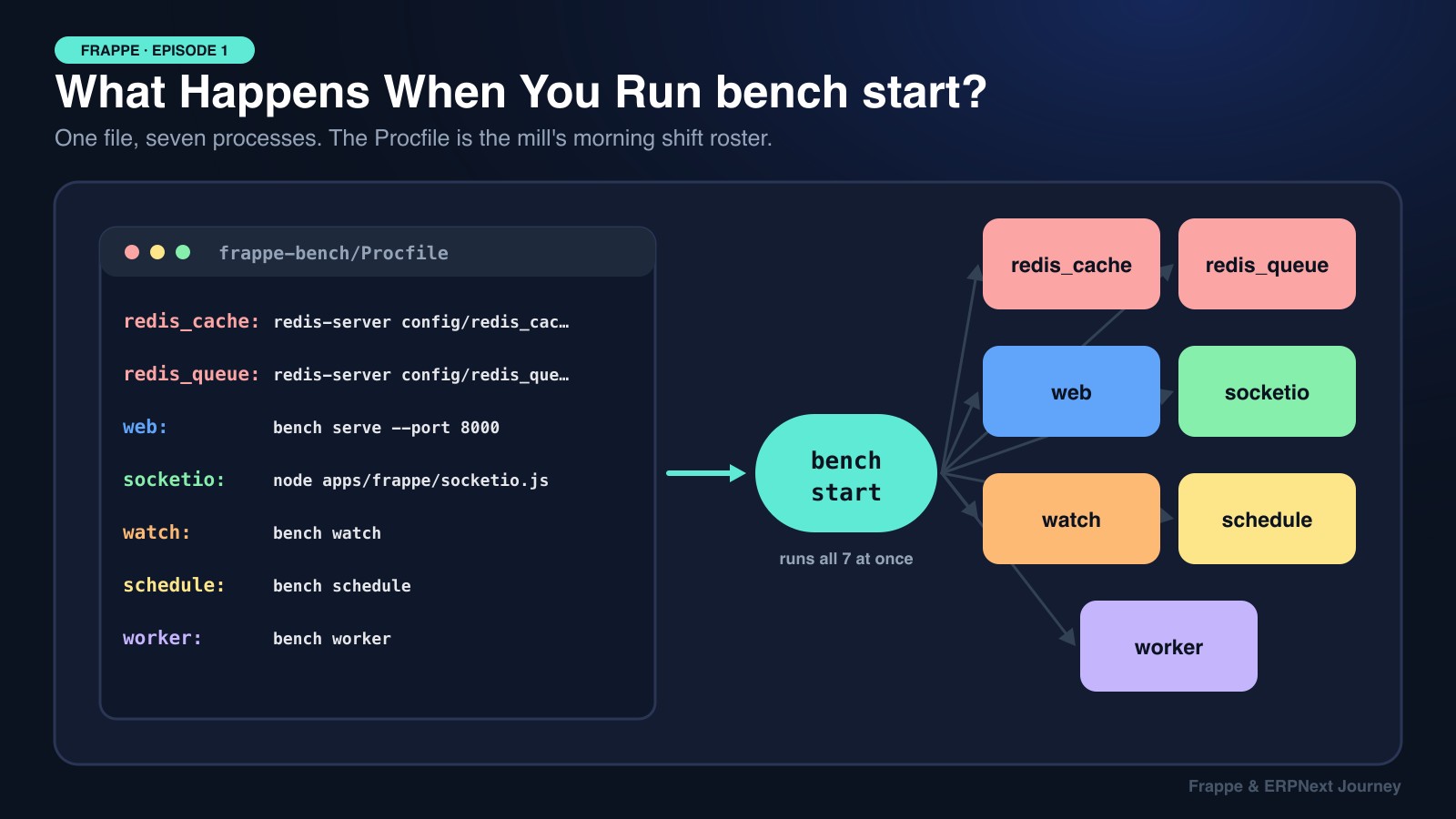
Most Frappe developers run bench start every day without knowing what those seven processes are. Once you know, debugging gets much easier: "my background job never ran" or "realtime updates stopped" stops being a mystery, because you know which machine is switched off.
📺 Credit: This episode follows the structure of Build With Hussain's video "Understanding Frappe's Procfile & Processes". Watch it, it's excellent. This is my written version, with diagrams, code, and examples from my own ERPNext work.
Keywords
- Bench: The command-line tool and folder (
frappe-bench/) that holds your Frappe apps, sites, configs, and logs. - Procfile: A plain text file listing every process to start, one per line:
name: command. - Honcho: The small Python tool
bench startuses to read the Procfile and run every line at once. - WSGI / Werkzeug: The Python web layer Frappe is built on. Frappe doesn't write its own web server from scratch.
- Redis: A super-fast in-memory store. Frappe runs two Redis instances: one for cache, one for queues.
- RQ (Redis Queue): The Python library Frappe uses for background jobs.
- Scheduler: The process that decides when scheduled jobs are due.
- Worker: The process that actually runs background jobs.
- Socket.IO: A Node.js process that pushes realtime updates to the browser.
- Supervisor: The process manager used in production instead of Honcho.
Character Mapping
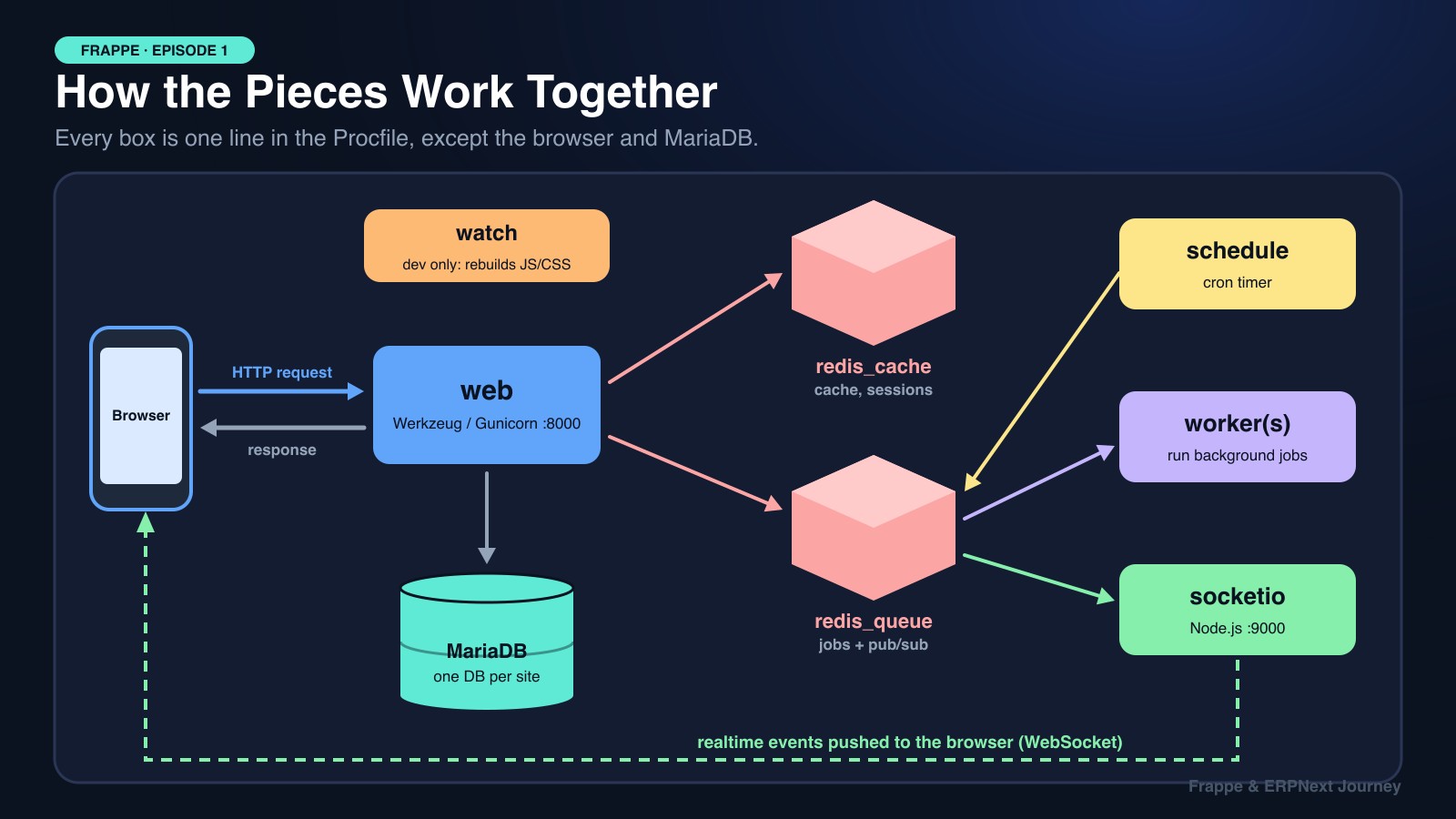
- Procfile: The shift supervisor's roster on the clipboard.
bench start(Honcho): The supervisor flipping every switch on the roster.- web: The front office. Takes requests, sends back pages.
- MariaDB: The record room. It's always open, not part of the morning roster.
- redis_cache: The notice board by the door with frequently needed info.
- redis_queue: The job ticket rail between the office and the floor.
- schedule: The alarm clock that says "it's time for the monthly report."
- worker: The floor operators who pick up job tickets and do the work.
- socketio: The PA system that announces updates to everyone instantly.
1. Meet the Procfile
When you run bench init, Bench creates a frappe-bench/ folder. Ignore the sub-folders for now and open the one file that matters here: Procfile.
redis_cache: redis-server config/redis_cache.conf
redis_queue: redis-server config/redis_queue.conf
web: bench serve --port 8000
socketio: /usr/bin/node apps/frappe/socketio.js
watch: bench watch
schedule: bench schedule
worker: bench worker 1>> logs/worker.log 2>> logs/worker.error.log
Each line is process-name: command-to-run. That's it. bench start hands this file to Honcho, which starts all seven commands together and color-codes their logs in your terminal so you can tell web output from worker output.
There's no magic here. If you comment out every line except web and run that command yourself, you get a working web server. bench start is just a convenient way to run all seven at once.
2. The Web Server (web)
web: bench serve --port 8000This is the process you talk to when you open http://mysite.localhost:8000. The browser sends an HTTP request, and web sends back a response: a page, JSON, a file.
Under the hood, Frappe is a WSGI application built on Werkzeug. If you open apps/frappe/frappe/app.py, you'll see an application function wrapped with Werkzeug's request and response tools. Every desk page, every REST call, and every frappe.call() from a form script goes through it.
- In development,
bench serveruns Werkzeug's built-in server. In developer mode it also auto-reloads when you save a Python file. - In production, the same
frappe.app:applicationis served by Gunicorn, a battle-tested multi-worker Python server.
If the site doesn't load at all, start your debugging here.
3. bench watch (Development Only)
watch: bench watchThis one is for development only and never runs in production. bench watch keeps an eye on your app's frontend assets (JavaScript, CSS, Vue files inside public/) and rebuilds the bundles every time you save. Without it, you'd run bench build after every client-script change.
💡 A common mix-up:
bench watchhandles JS/CSS. The Python auto-reload comes frombench servein developer mode. In production, neither happens. After deploying new code, you runbench buildandbench restartyourself.
4. Wait, Where Is the Database?
You won't find MariaDB in the Procfile, and that's on purpose.
The database server is a separate, always-running service on your machine (installed with your OS package manager or Docker). Bench assumes it's already up. When you ran bench new-site mysite.localhost, Bench asked for the MariaDB root password, then created a brand-new database just for that site. The site's database name and password live in sites/mysite.localhost/site_config.json.
One site = one database. That's how a single bench can host several ERPNext companies with fully separate data.
5. Redis Cache (redis_cache)
redis_cache: redis-server config/redis_cache.confWhen you click Reload or run bench clear-cache, this is the cache you're clearing. Frappe stores frequently used data here so it doesn't hit MariaDB every time: DocType metadata, user sessions, permissions, system settings, and anything you store with frappe.cache.
Open config/redis_cache.conf and you'll find a few interesting settings:
port: The port this Redis listens on (separate from the queue Redis).maxmemory: A RAM limit, since the cache lives entirely in memory.maxmemory-policy allkeys-lru: When memory is full, evict the least recently used keys first. Hot data stays, stale data goes.
If you ever want to try a different Redis setting locally, edit this file and restart bench.
# Caching an expensive lookup in your own app
def get_lot_quality(lot_no):
    key = f"lot_quality:{lot_no}"
    data = frappe.cache.get_value(key)
    if data is None:
        data = frappe.db.get_value("Cotton Lot", lot_no,
                                   ["micronaire", "staple_length", "trash_percent"], as_dict=True)
        frappe.cache.set_value(key, data, expires_in_sec=3600)
    return data
6. Redis Queue (redis_queue)
redis_queue: redis-server config/redis_queue.confThe second Redis instance has two jobs:
- Holding background jobs waiting to run (via RQ).
- Carrying realtime events from Python to Socket.IO with pub/sub (more in section 9).
Older Frappe versions ran three Redis instances, with a separate one for Socket.IO. Modern Frappe merged that into
redis_queue, so now there are just two.
7. The Scheduler (schedule)
schedule: bench scheduleThe scheduler is Frappe's alarm clock. You declare scheduled jobs in your app's hooks.py, and the scheduler wakes up regularly to check: "Is anything due yet?"
# hooks.py in a custom app
scheduler_events = {
    "daily": [
        "mill_erp.commercial.tasks.notify_expiring_lcs",
    ],
    "cron": {
        # 9:00 AM on the 1st of every month
        "0 9 1 * *": ["mill_erp.accounts.tasks.finalize_monthly_invoices"],
    },
}
You can use simple frequencies (all, hourly, daily, weekly, monthly) or full cron expressions when you need something precise, like "9 AM on the 1st".
The Key Insight: The Scheduler Doesn't Run Your Job
When a job is due, the scheduler doesn't execute it. It just puts a ticket on the redis_queue rail and goes back to watching the clock. Running the job is somebody else's work.
That's why scheduled jobs silently do nothing when the scheduler is disabled for a site. Check with:
bench --site mysite.localhost scheduler status
bench --site mysite.localhost enable-scheduler
8. Background Workers (worker)
worker: bench worker 1>> logs/worker.log 2>> logs/worker.error.logWorkers are the floor operators. Each worker is a Python process that loads your Frappe site context, then loops forever: pick a job from the queue → run it → pick the next one.
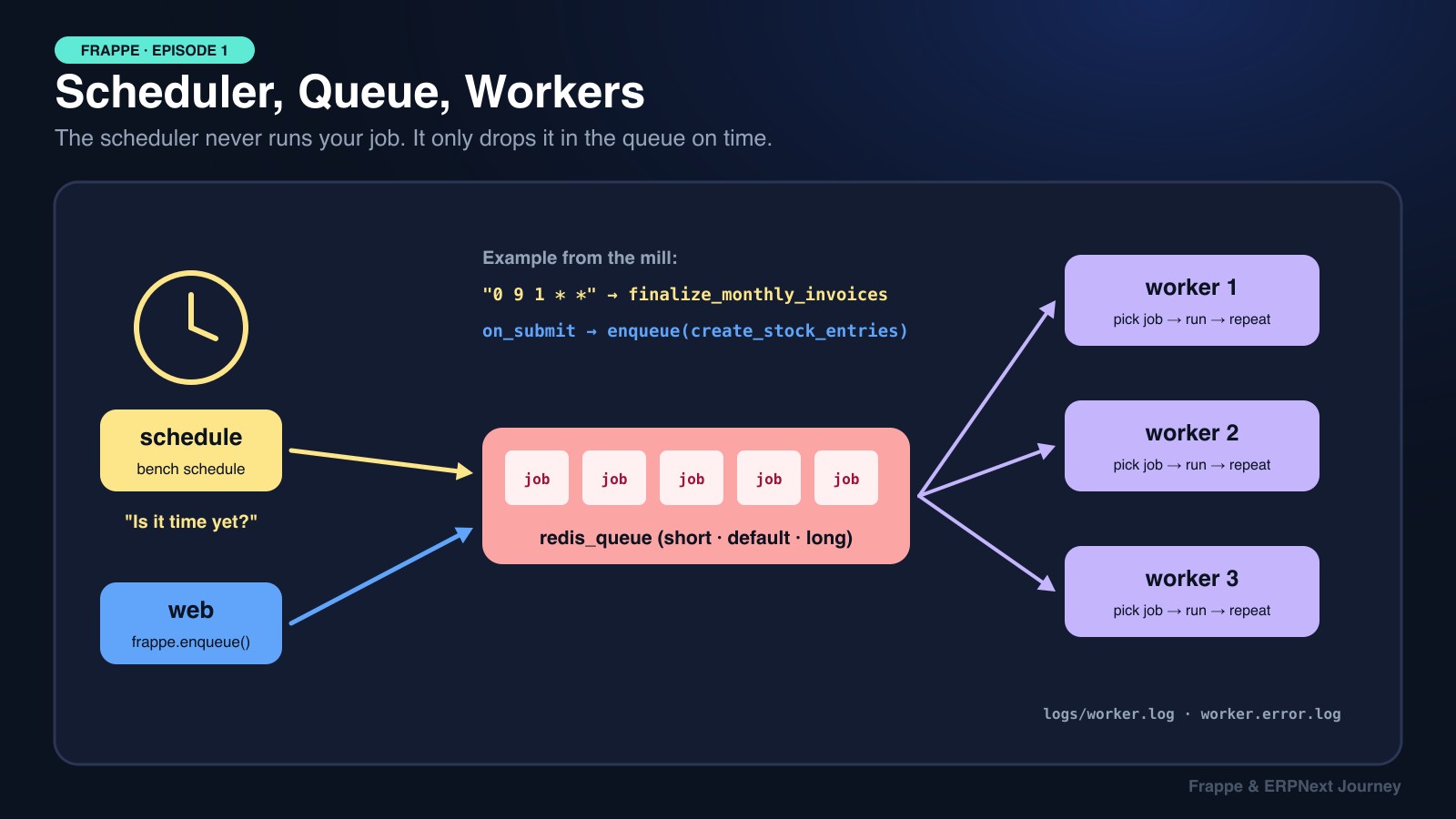
Jobs reach the queue in two ways:
- The scheduler queues jobs that are due.
- Your own code queues slow work with
frappe.enqueue, so the user isn't stuck waiting.
Here's a real pattern from the mill. When a manager submits a Mixing Plan, we need to create stock entries for dozens of cotton bales. That's too slow for a button click, so we push it to a worker:
class MixingPlan(Document):
    def on_submit(self):
        frappe.enqueue(
            "mill_erp.production.tasks.create_blowroom_stock_entries",
            queue="long",
            timeout=1500,
            mixing_plan=self.name,
            enqueue_after_commit=True,  # only queue if the submit actually commits
        )
Frappe has three standard queues: short, default, and long. In development, the single bench worker listens to all of them. In production, you usually run separate workers per queue, so a 20-minute report can't block quick jobs.
Where to Look When a Job Fails
logs/worker.log: jobs started and completed successfully.logs/worker.error.log: crashes, tracebacks, import errors.- In the desk: RQ Job and Error Log lists.
9. Socket.IO: How Realtime Actually Works (socketio)
socketio: /usr/bin/node apps/frappe/socketio.jsThis is the most interesting process, and the only one written in JavaScript. It's the reason Frappe needs Node.js installed.
Why Do We Need It?
Normal HTTP is a one-way conversation: the browser asks, the server answers. The server can't call the browser out of the blue and say "a new comment was added." But ERPNext does exactly that: forms refresh when someone else edits them, progress bars move during long jobs, and notifications pop up instantly.
That's Socket.IO. When your desk page loads, the browser opens a long-lived WebSocket connection to the socketio process (port 9000 by default; in production, NGINX proxies /socket.io to it). Now the server side can push messages at any time.
The Puzzle: Python Can't Speak Socket.IO
The web process (Python) knows when something happened: a document was saved, a job finished. But only the socketio process (Node.js) holds the browser connections. How does Python tell Node?
Through redis_queue, using publish/subscribe:
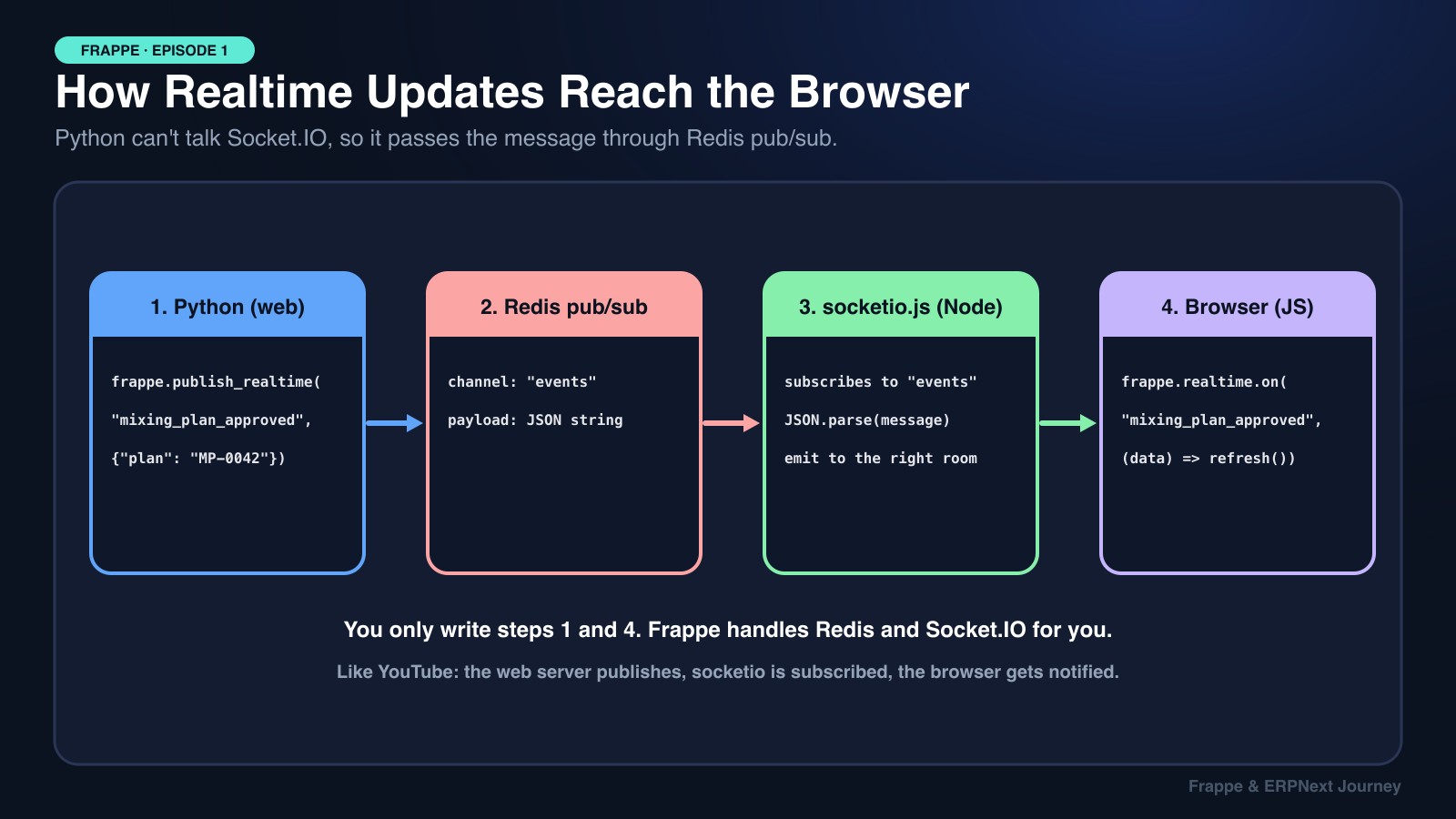
Step 1: Python publishes. Your code calls frappe.publish_realtime(...). Frappe turns the message into a JSON string and publishes it to the Redis channel named events.
Step 2: Redis notifies subscribers. Redis delivers the message to everyone subscribed to events.
Step 3: socketio.js is subscribed. Open apps/frappe/socketio.js (it loads realtime/), and you'll find it subscribing to the same events channel. It parses the JSON and emits the event to the right browser "room" (a user, a document, or everyone).
Step 4: The browser reacts. Your client code listening with frappe.realtime.on receives it.
It works like YouTube notifications: the web server is the creator uploading a video, Redis is YouTube, and socketio is the subscriber who pressed the bell. It then tells the actual viewer, the browser.
What You Actually Write
You only touch both ends. Frappe handles everything in between:
# Python: after the Mixing Plan is approved
frappe.publish_realtime(
    "mixing_plan_approved",
    {"plan": self.name, "line": self.blowroom_line},
    doctype="Mixing Plan",
    docname=self.name,
    after_commit=True,
)// JavaScript: on the floor supervisor's dashboard
frappe.realtime.on("mixing_plan_approved", (data) => {
frappe.show_alert({ message: `Plan ${data.plan} approved for ${data.line}`, indicator: "green" });
cur_list && cur_list.refresh();
});Now that you know the path, you can debug it: if alerts stop arriving, check that socketio is running, that redis_queue is up, and that the event names match exactly on both sides.
10. What Happens in Production?
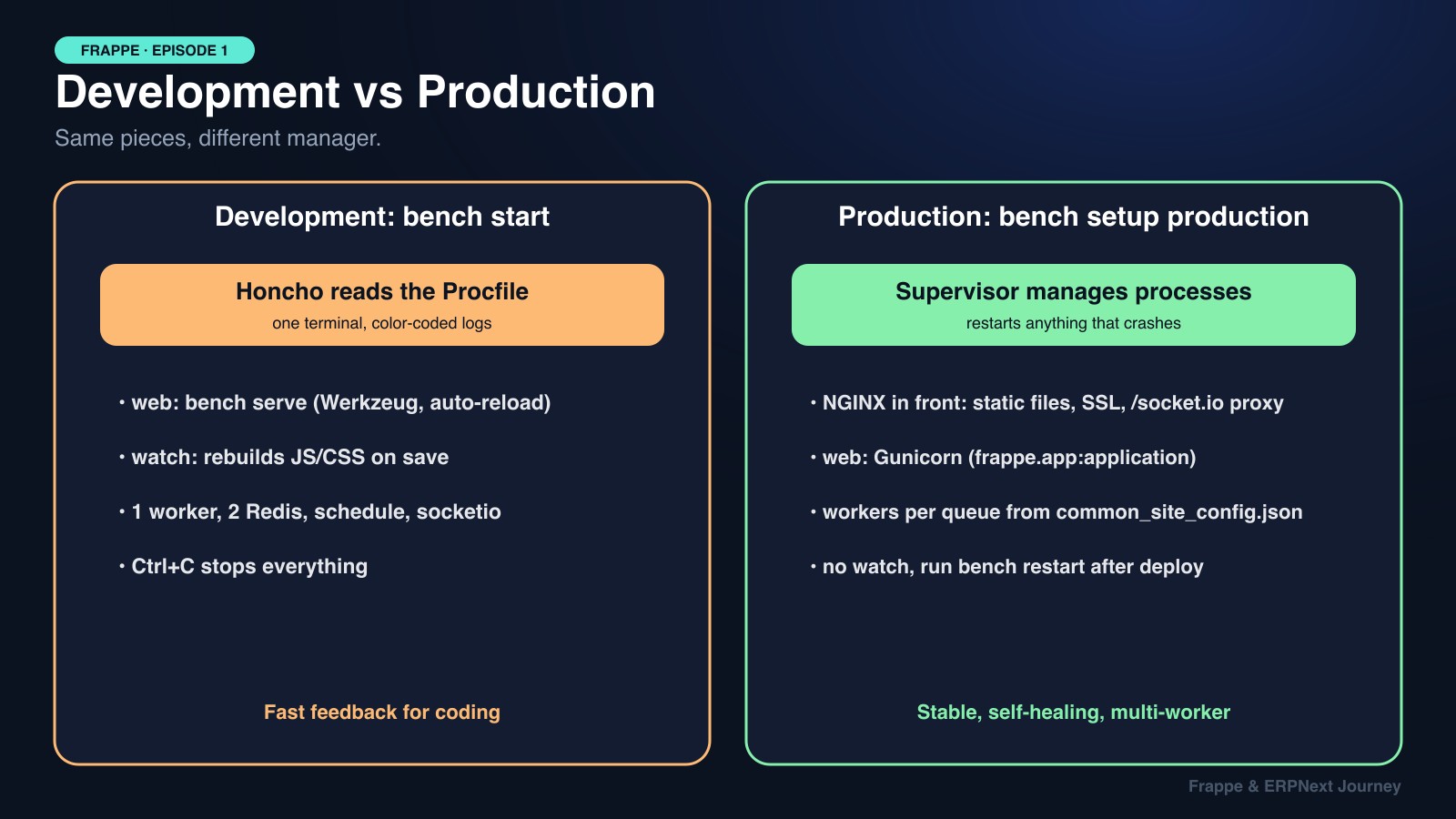
In production, the Procfile isn't used at all. Running bench setup production <user> generates configs for two different tools:
- Supervisor (
config/supervisor.conf): starts and watches every process (Gunicorn web workers, Redis, scheduler, background workers, socketio) and restarts them automatically if they crash. - NGINX (
config/nginx.conf): sits in front of everything, serves static files, handles SSL, and proxies/socket.iotraffic to the Node process.
How many background workers run (and for which queues) comes from common_site_config.json, e.g. "background_workers": 2. Bench reads it when generating the Supervisor config. Same pieces, different manager:
🛠️ Development (bench start) | 🚀 Production (bench setup production) | |
|---|---|---|
| Process manager | Honcho reads the Procfile | Supervisor, generated config |
| Web server | Werkzeug dev server, auto-reload | Gunicorn behind NGINX |
| Asset building | bench watch rebuilds on save | bench build once per deploy |
| Workers | One worker for all queues | Workers per queue, count from config |
| Crash handling | Process dies, you notice in the terminal | Supervisor restarts it automatically |
| After code changes | Mostly automatic | bench migrate, bench build, bench restart |
🍕 Explain It Like You're 5
Imagine a big toy factory. Before the day starts, the manager reads a list: "Turn on the front desk, the notice board, the job ticket rail, the alarm clock, the workers, and the loudspeaker."
The front desk talks to customers. The notice board remembers popular answers. The alarm clock says when it's time for chores, but it only writes a ticket. The workers pick up tickets and do the chores. And the loudspeaker shouts news to everyone right away.
That list is the Procfile, and reading it out loud is
bench start!
🎯 Debugging Cheat Sheet
This is where knowing the processes pays off. When something breaks, ask "which process is responsible?":
| Symptom | Process to check | What to look at |
|---|---|---|
| Site won't load | web | Terminal output, port 8000, bench serve errors |
| JS/CSS changes not showing | watch | Is bench watch running? Try bench build |
| "Can't connect to MySQL" | MariaDB (outside bench) | Is the DB service running? site_config.json creds |
| Stale data after a fix | redis_cache | bench --site <site> clear-cache |
| Scheduled job never ran | schedule | bench --site <site> scheduler status |
frappe.enqueue job never ran | worker | logs/worker.error.log, RQ Job list |
| Realtime alerts stopped | socketio + redis_queue | Node process running? Event names match? |
Key Takeaways for Interviews
bench start= Honcho + Procfile. Seven processes, each with one clear job. MariaDB runs separately.- Two Redis instances. One for cache (LRU eviction), one for queues and realtime pub/sub.
- Scheduler queues, workers execute. Keeping these separate is what makes background work reliable and scalable.
- Realtime = Python → Redis pub/sub → Node Socket.IO → browser. Developers only write
frappe.publish_realtimeandfrappe.realtime.on. - Production swaps the manager, not the pieces. Supervisor + NGINX + Gunicorn replace Honcho and the Werkzeug dev server.
📚 Official Sources
Everything here is checked against Frappe's own documentation and blog:
- Bench Procfile, Frappe docs
- Background Jobs (enqueue, queues, scheduler_events)
- Realtime (publish_realtime, rooms, Redis pub/sub)
- Production Setup (Supervisor, NGINX)
- Build With Hussain: Understanding Frappe's Procfile & Processes
Next episode: why does almost every Frappe guide say "use Ubuntu"? We'll look at what Frappe needs from Linux, and how to run it on Windows anyway with WSL2 or Docker.