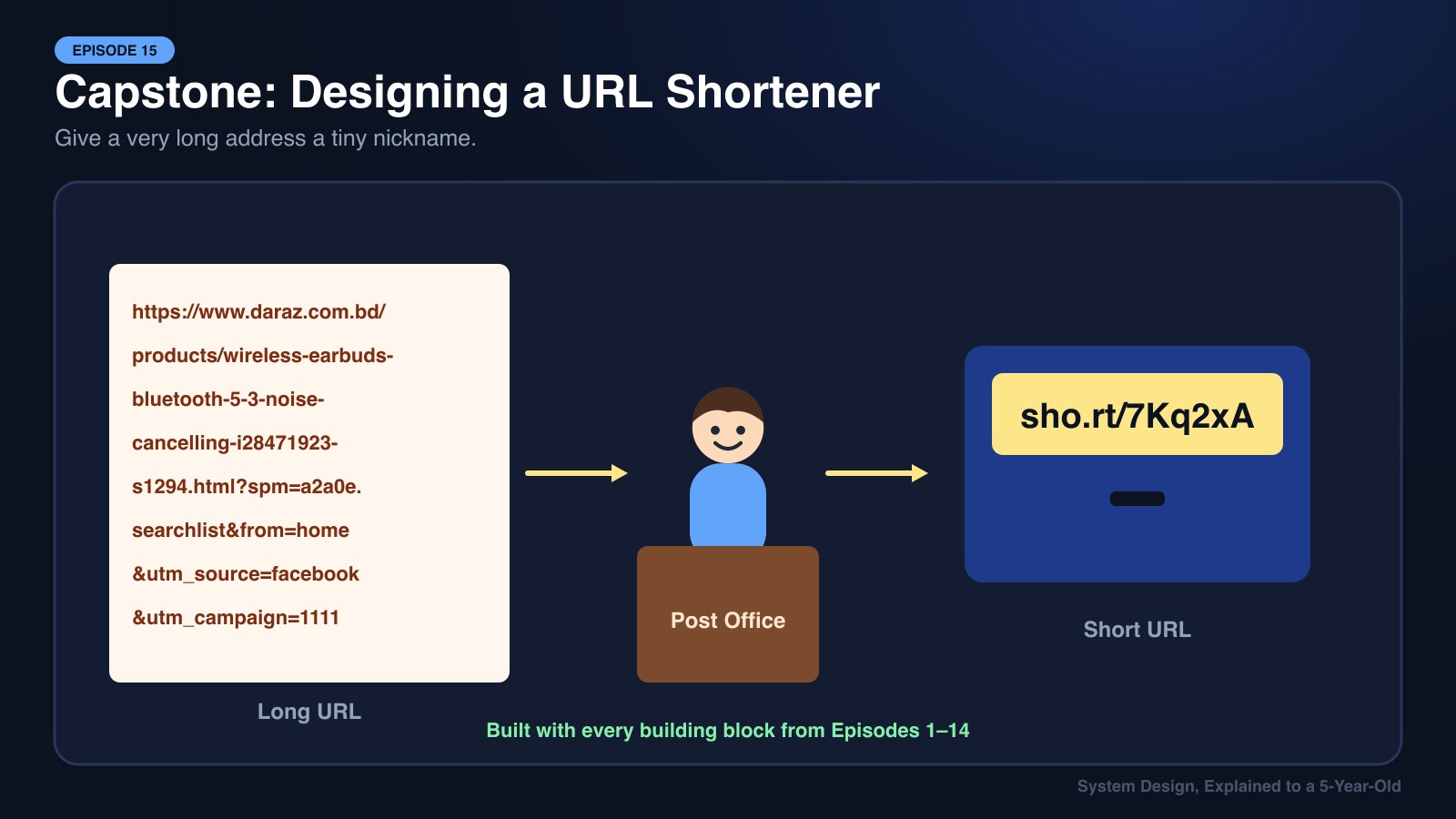
Imagine your friend lives at "House 47, Lane 12, Block C, Sector 7, Uttara Model Town, Dhaka-1230, Bangladesh." Every time you tell someone how to get there, you have to say that whole long thing.
So you make a deal with the post office. They give your friend's house a tiny nickname: "Box 7Kq." Now anyone can say "Take me to Box 7Kq", and the post office looks up the nickname and points them to the full address.
That's a URL Shortener. It turns
https://www.daraz.com.bd/products/wireless-earbuds-bluetooth-5-3-noise-cancelling-i28471923-s1294.html?spm=a2a0e.searchlist
into
https://sho.rt/7Kq2xA
This is the final episode of the series. Instead of learning a new piece, we'll build a real system from scratch, the way you would in a system design interview, and use every building block from Episodes 1–14 along the way.
The Building Blocks We'll Use
| Episode | Building Block | Its Job in Our URL Shortener |
|---|---|---|
| 1 | DNS | Turns sho.rt into our servers' IP address |
| 2 | TCP | Reliable connection for every click |
| 3 | HTTPS | Encrypts links in transit |
| 4 | REST API | POST /urls to create, GET /{code} to redirect |
| 5 | Load Balancer | Spreads millions of clicks across servers |
| 6 | CDN | Serves the website and caches popular redirects at the edge |
| 7 | Redis Cache | Answers hot short codes in under a millisecond |
| 8 | API Gateway | Auth, API keys, routing |
| 9 | SQL vs NoSQL | Picks the right database |
| 10 | Message Queue | Records click analytics in the background |
| 11 | Replication & Sharding | Stores billions of links safely |
| 12 | Rate Limiting | Stops spammers from creating millions of links |
| 13 | Consistent Hashing | Spreads cache and data across nodes |
| 14 | CAP Theorem | Decides AP vs CP for each piece |
Step 1: Ask What We're Building (Requirements)
In an interview, never start drawing boxes right away. First, agree on what the system must do.
Functional Requirements (What it does)
- Given a long URL, create a short URL.
- Visiting the short URL redirects to the original long URL.
- Users can optionally pick a custom alias (
sho.rt/eid-sale). - Links can have an expiry date.
- Owners can see basic click analytics.
Non-Functional Requirements (How well it does it)
- Very fast redirects: under 50 ms. Nobody wants to wait just to be sent somewhere else.
- Highly available: if redirects break, every printed QR code and shared link in the world breaks.
- Short codes must be unique: two long URLs must never get the same code.
- Not guessable: people shouldn't be able to walk through codes and discover private links.
Step 2: Back-of-the-Envelope Math 🧮
Quick estimates tell us how big to build:
- New links: 100 million per month ≈ 40 writes/second (peak ~400/s)
- Read:write ratio: links are clicked far more than created, say 100:1
- Redirects: ≈ 4,000 reads/second (peak ~40,000/s)
- Storage: each record ≈ 500 bytes × 100M/month × 12 months × 5 years ≈ 3 TB
Takeaway: This is a read-heavy system. Caching and fast reads matter far more than write speed.
Step 3: Design the API (Episode 4)
POST /api/v1/urls
Body: { "longUrl": "https://...", "customAlias": "eid-sale", "expiresAt": "2027-01-01" }
Response 201: { "shortUrl": "https://sho.rt/7Kq2xA" }

GET /{shortCode}
Response 301 or 302 → Location: https://original-long-url...
301 vs 302: A Small Choice with Big Effects
- 301 Moved Permanently: Browsers remember it and skip our server next time. Less load, but we lose click analytics.
- 302 Found (Temporary): Browsers always ask us first. More load, but we can count every click.
Since analytics is a requirement, we choose 302.
Step 4: Generate the Short Code 🎲
This is the heart of the problem. How do we turn a long URL into 7Kq2xA?
Base62 Encoding
We use 62 characters: a–z, A–Z, 0–9.
- 6 characters → 62⁶ ≈ 56.8 billion combinations
- 7 characters → 62⁷ ≈ 3.5 trillion combinations
Plenty for many years.
Option A: Hash the Long URL
Take MD5(longUrl), keep the first 7 characters.
- ❌ Two different URLs can collide on the same first 7 characters. We'd need to check and retry.
- ❌ The same URL always gets the same code, which is bad if two users want separate analytics.
Option B: Unique Counter + Base62 ✅
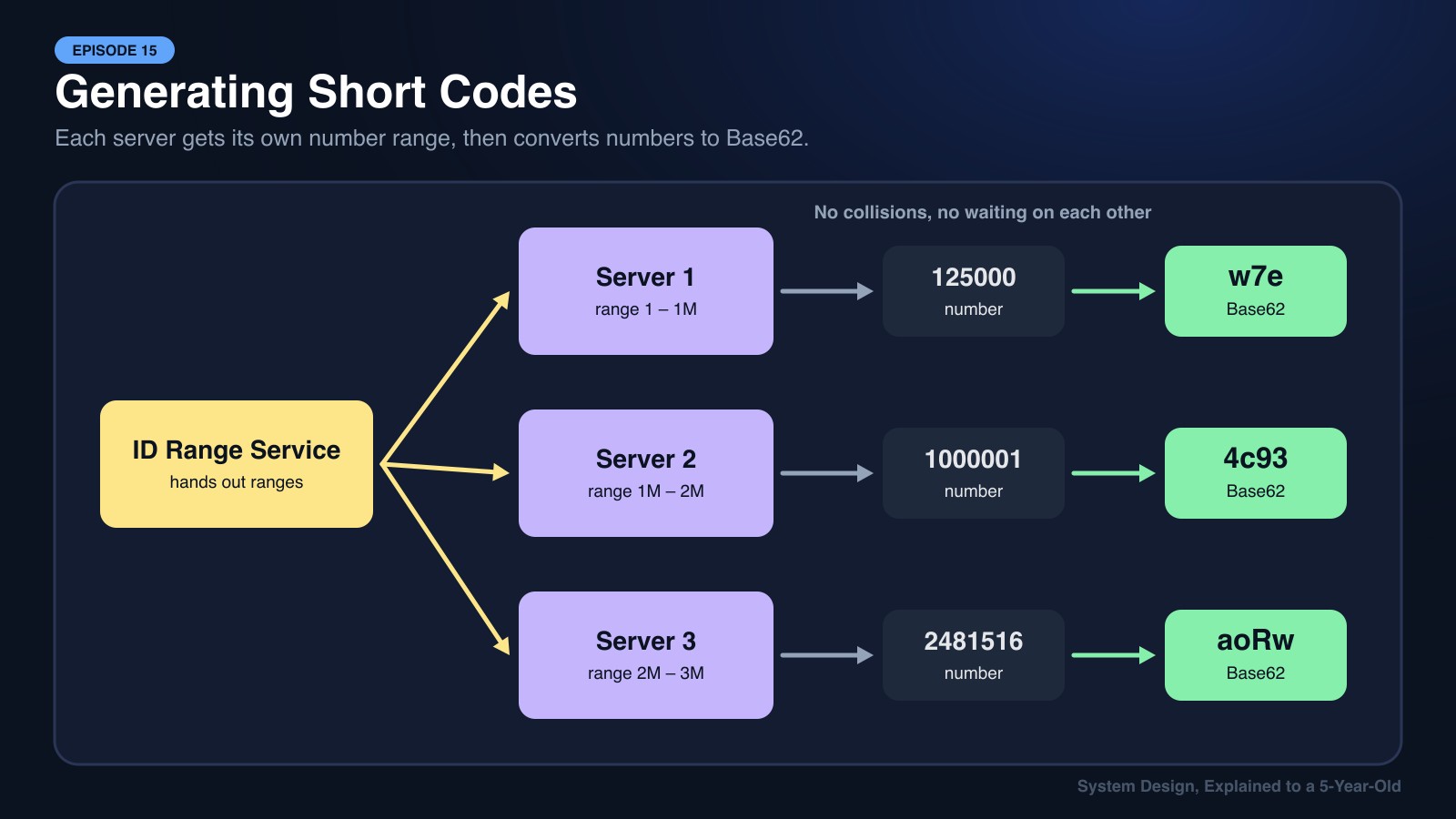
Give every new link a unique number (1, 2, 3, … 125,000,000,000) and convert it to Base62.
- ✅ No collisions, ever.
- ⚠️ Sequential codes are guessable, so we shuffle the number (or add a random salt) before encoding.
- ⚠️ A single counter is a bottleneck. Fix: a small coordination service hands each app server a range of IDs (Server 1 gets 1–1,000,000; Server 2 gets 1,000,001–2,000,000). Each server counts through its own range without talking to anyone.
Step 5: Choose the Database (Episodes 9, 11, 13, 14)
Our data is very simple: shortCode → { longUrl, ownerId, createdAt, expiresAt }.
- No complex joins
- Billions of rows
- Huge read volume, lookups always by
shortCode
That's a perfect fit for a NoSQL key-value store like DynamoDB or Cassandra (Episode 9).
- Sharding (Episode 11): shard key =
shortCode. Codes are random, so traffic spreads evenly with no hot shards. - Consistent Hashing (Episode 13): adding storage nodes later moves only a small slice of data.
- Replication: each code stored on 3 replicas across availability zones.
- CAP (Episode 14): redirects lean AP. During a network glitch, it's better to keep redirecting than to show errors. A brand-new link taking a second to appear everywhere is fine. User accounts and billing (if we add a paid plan) live in a separate SQL database (CP).
Step 6: Make Redirects Lightning Fast (Episodes 5, 6, 7)
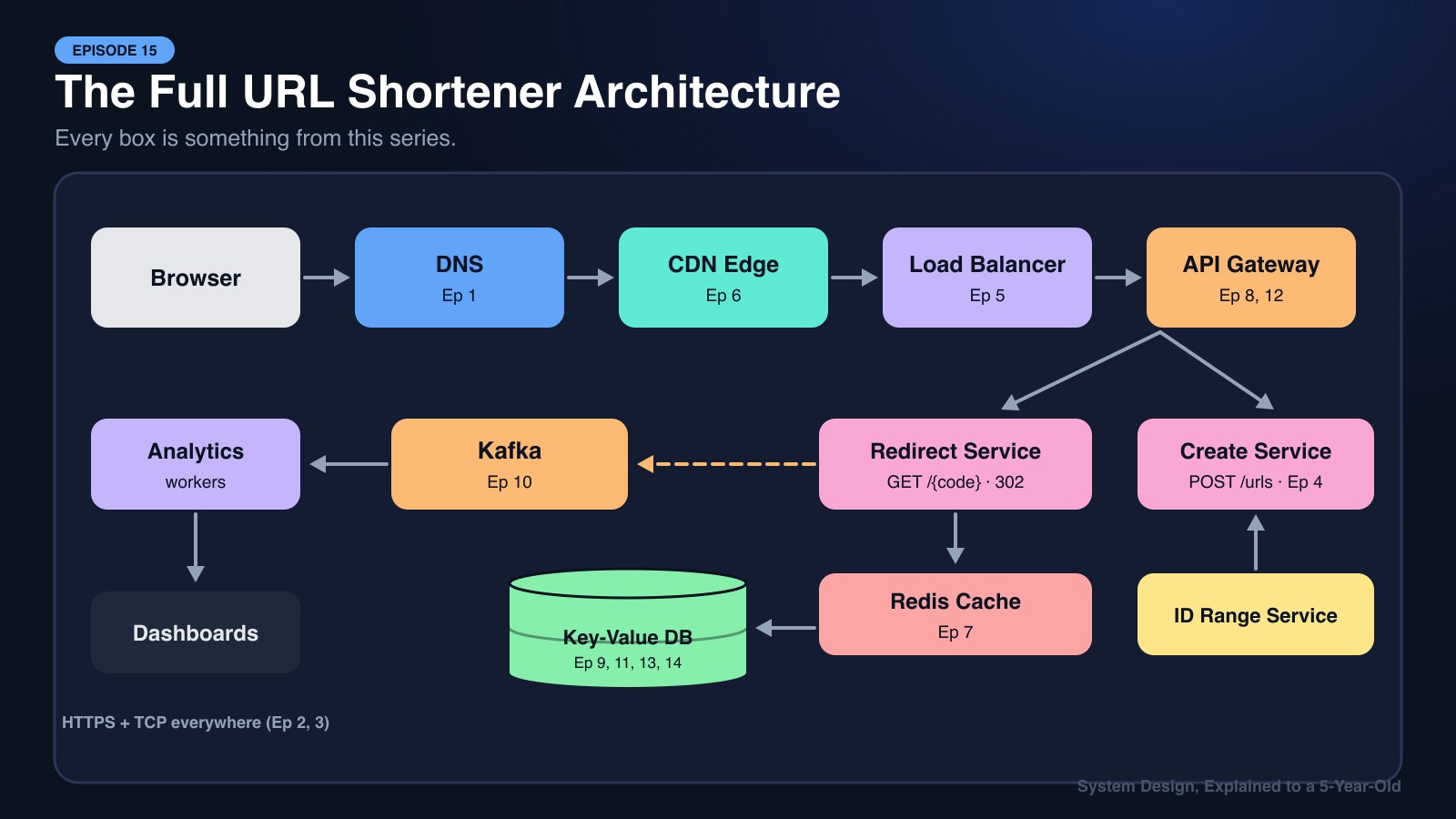
Let's follow one click on https://sho.rt/7Kq2xA:
1. DNS (Ep 1): The browser asks, "Where is sho.rt?" and gets the IP of the nearest edge location.
2. TCP + HTTPS (Ep 2, Ep 3): A secure connection is opened.
3. CDN Edge (Ep 6): Viral links (a link shared by a celebrity) can be cached at the edge for a short time, so millions of clicks never even reach our servers.
4. Load Balancer (Ep 5): Spreads remaining requests across many identical, stateless app servers.
5. Redis Cache (Ep 7): The app server checks Redis first. Since about 20% of links get 80% of clicks, most lookups end here in under a millisecond. We use cache-aside with LRU eviction.
6. Database (only on cache miss): Fetch from the key-value store, save the result in Redis, and return.
7. Redirect: Respond with 302 Location: <longUrl>. Total time: a few milliseconds.
Step 7: Analytics Without Slowing Down Redirects (Episode 10)
If we wrote to the analytics database on every click before redirecting, every redirect would get slower.
Instead, the app server drops a tiny message on a Kafka queue (Episode 10) and redirects immediately:
{ "code": "7Kq2xA", "time": "...", "country": "BD", "device": "mobile", "referrer": "facebook.com" }Background consumers read the stream and update click counts, country charts, and device breakdowns. If analytics falls behind for a minute, nobody's redirect is affected.
Step 8: Protect the System (Episodes 8, 12)
- API Gateway (Ep 8): Checks API keys and login tokens on
POST /urls, terminates SSL, and routes create requests vs redirect requests to different services. - Rate Limiting (Ep 12): A token bucket per user and per IP, e.g., 100 new links per hour for free accounts, so spammers can't create millions of phishing links.
- Malicious URL check: New long URLs are scanned against a blocklist (also a good background job for the queue).
The Final Architecture
            User's Browser
                  │
          DNS ──► CDN Edge (cache viral redirects)
                  │
            Load Balancer
                  │
            API Gateway  (auth, rate limiting, SSL)
           ┌──────┴──────────┐
   Redirect Service     Create-URL Service ◄── ID Range Service
           │                 │
      Redis Cache            │
           │                 │
   Key-Value DB (sharded + replicated, consistent hashing)
           │
   Kafka ──► Analytics Workers ──► Analytics DB / Dashboards
Every box in that picture is something you learned in this series. 🎉
🍕 Explain It Like You're 5
You have a really long name for your teddy bear: "Sir Fluffington the Third of Cuddle Castle."
So you give him a short nickname, "Fluffy," and write both in a little notebook.
Whenever someone says "Fluffy," you look in your notebook and know exactly which teddy they mean. If lots of friends keep asking about Fluffy, you just remember the answer in your head instead of opening the notebook every time (that's caching!).
That notebook is a URL Shortener!
🎯 The System Design Interview Summary
"Design a URL shortener" is often the first system design question people get. Here's the winning approach:
- Clarify requirements: functional + non-functional. Ask about scale and analytics.
- Estimate: it's read-heavy (~100:1), so caching is the key.
- Define the API:
POST /urls,GET /{code}, and explain 301 vs 302. - Short code generation: Base62 + distributed counter ranges (no collisions), shuffled so codes aren't guessable.
- Storage: key-value NoSQL, sharded by short code, replicated, AP for redirects.
- Speed: CDN → load balancer → stateless servers → Redis → database.
- Async analytics: Kafka so clicks never slow down redirects.
- Protection: rate limiting, API gateway auth, malicious URL scanning.
🎓 That's a Wrap!
Fifteen episodes ago, we started with a simple question: how does typing a name into your browser find the right computer? Since then, we've met mailmen and paper planes, waiters and kitchens, supermarket line managers, neighborhood toy stores, study desks, hotel concierges, filing cabinets, bakery ticket rails, photocopied libraries, candy jars, round lunch tables, and scorekeepers with broken walkie-talkies.
Every giant app you use (Facebook, YouTube, Pathao, bKash, Daraz, Foodpanda) is built from these same simple ideas, stacked together carefully.
If you're preparing for interviews, go back to Episode 1 and try explaining each concept out loud using its analogy. If you can explain it to a 5-year-old, you understand it well enough to explain it to an interviewer. 🚀
Thanks for following along!