On the textile mill ERP team, half of us had Windows laptops. The first week went like this: someone runs pip install frappe-bench, it installs fine, bench init starts... and an hour later we're reading error messages about fork, Redis, and bash\r.
The senior developer just said: "Use Ubuntu." We all did, and the problems disappeared. But nobody explained why.
This episode is that explanation. Frappe isn't against Windows. It's built from pieces that were made for Unix, and once you see them, the "use Ubuntu" rule makes complete sense.
Keywords
- Unix / POSIX: The family of operating systems Linux and macOS belong to. They share the same system calls and process model.
fork(): A Unix system call that makes an exact copy of a running process. Windows doesn't have it.- Gunicorn: The production Python web server Frappe uses. It describes itself as "a WSGI HTTP Server for UNIX".
- RQ (Redis Queue): The background job library behind Frappe workers (Episode 1).
- Supervisor: The Unix process manager that keeps Frappe running in production.
- WSL2: Windows Subsystem for Linux. A real Linux kernel running inside Windows.
- frappe_docker: The official Docker setup for Frappe and ERPNext.
Character Mapping
- Frappe: A machine built for a 220V factory.
- Ubuntu: The factory's own power socket. Plug in and go.
- Windows: A house with a different socket shape.
- WSL2 / Docker / VM: The adapter that gives the machine the power it expects.
1. The Five Reasons Frappe Needs Unix
Remember the seven processes from Episode 1? Look at what each one is built on.
Reason 1: Gunicorn Is Unix-Only 🌐
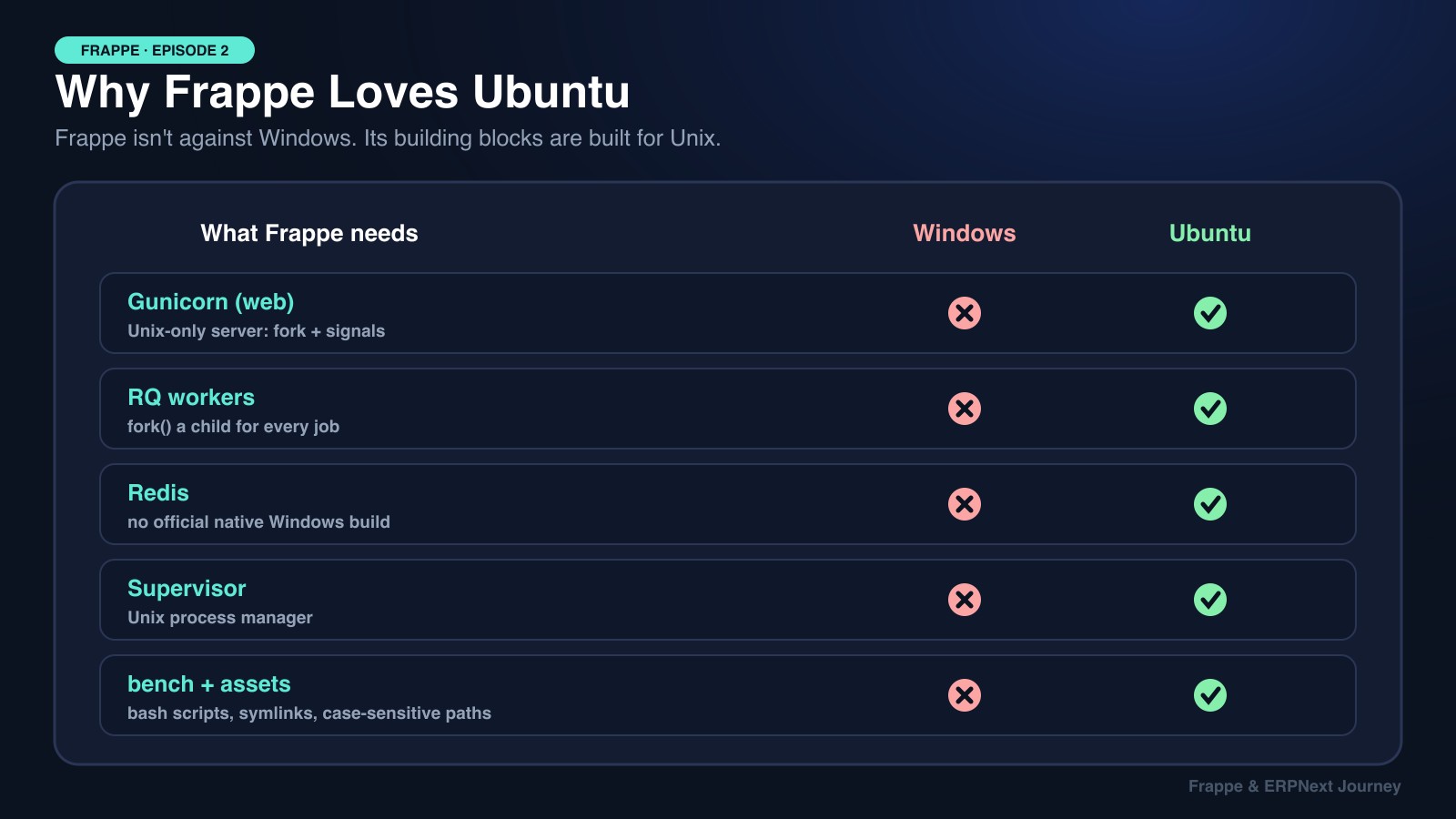
In production, Frappe's web process runs on Gunicorn. Gunicorn uses a "pre-fork" model: a master process forks several worker processes and controls them with Unix signals (SIGHUP to reload, SIGTERM to stop). Windows has neither fork() nor those signals, so Gunicorn simply doesn't run there.
Reason 2: RQ Workers Need fork() 🍴
This is the big one. When an RQ worker picks up a job, it forks a child process (RQ calls it the "work horse") to run that one job. If the job crashes or leaks memory, only the child dies, and the worker carries on.
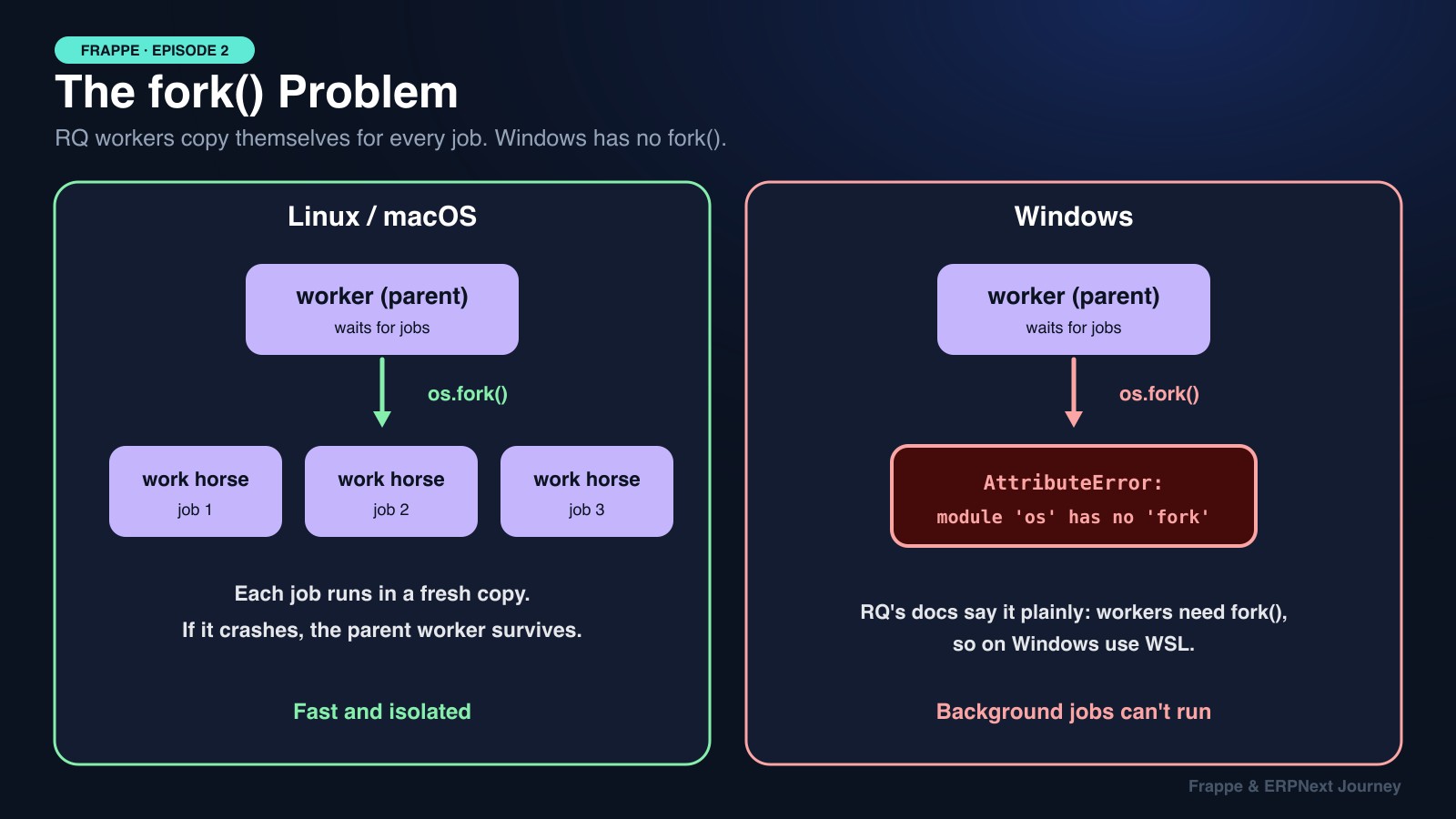
RQ's own documentation says workers only run on systems that implement fork(), and points Windows users to WSL. No workers means no background jobs, no scheduled tasks, and no emails sent from the queue. (This is the same consumer pattern as System Design Episode 10: Message Queues.)
Reason 3: Redis Has No Official Windows Build 🧱
Frappe runs two Redis servers (System Design Episode 7 explains Redis). Redis is developed for Linux. The old Microsoft port for Windows was archived years ago on a very old version.
Reason 4: Supervisor Is a Unix Process Manager 👷
In production, bench setup production generates a Supervisor config that starts every process and restarts anything that crashes. Supervisor relies on Unix process control and doesn't run on Windows.
Reason 5: Bench Itself Assumes a Unix Shell 🐚
Bench runs shell commands, uses symlinks (for example, sites/assets/ links to each app's public/ folder), and expects case-sensitive file paths and Unix line endings. On Windows you hit symlink permission errors, path mix-ups, and the classic /usr/bin/env: 'bash\r': No such file or directory caused by Windows CRLF line endings.
The Bonus Reason: Production Is Linux Anyway
Almost every ERPNext server in the world runs Ubuntu or Debian. Developing on the same OS you deploy to means fewer "works on my machine" surprises.
💡 macOS is fine. It's Unix-based, so
fork(), signals and symlinks all work. Many Frappe developers use a Mac with Homebrew.
2. Three Ways to Run Frappe on a Windows Laptop
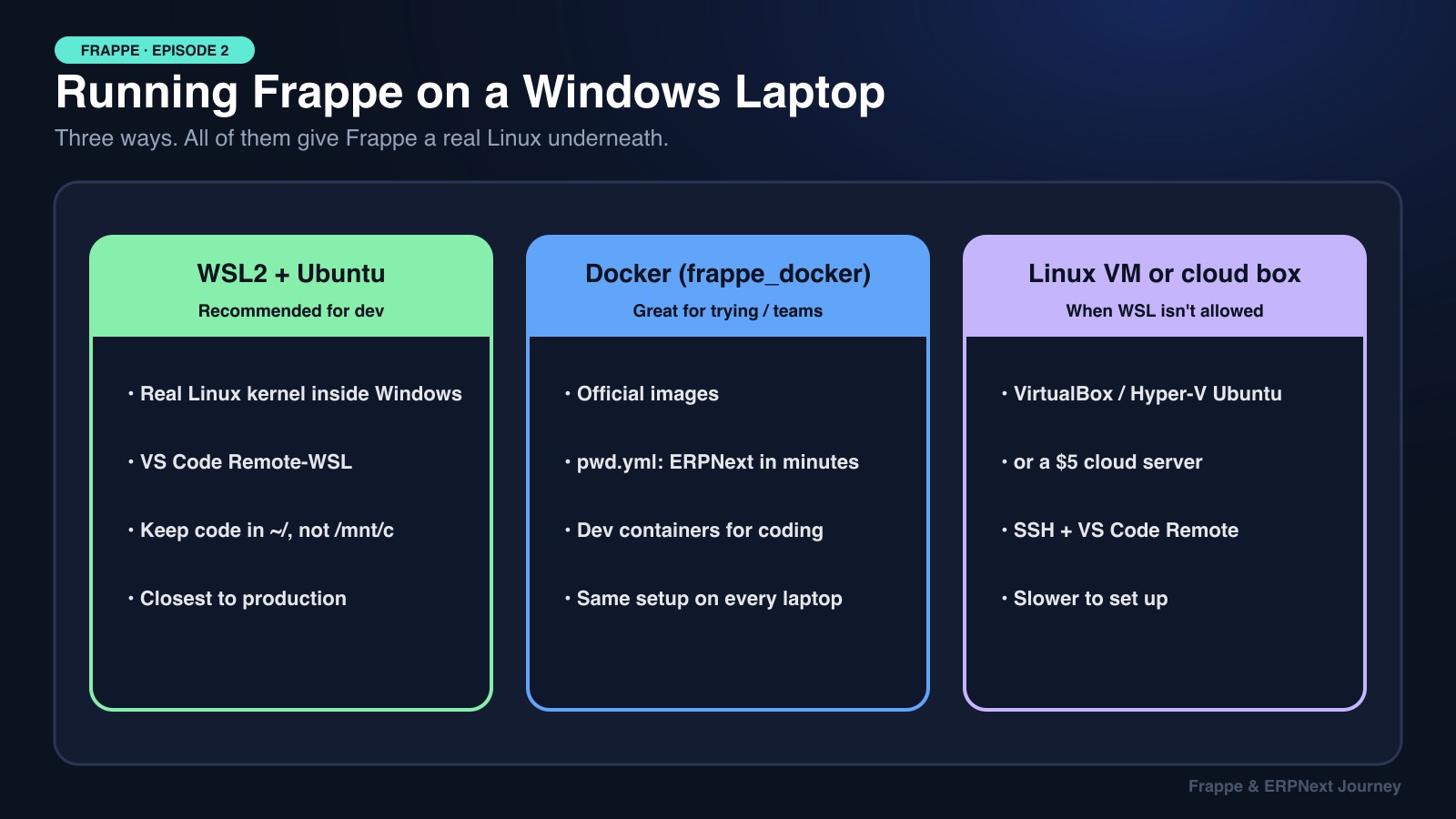
| 🐧 WSL2 + Ubuntu | 🐳 Docker (frappe_docker) | 🖥️ Linux VM / cloud server | |
|---|---|---|---|
| Best for | Daily development | Trying ERPNext, identical team setups | When WSL isn't allowed |
| Setup time | ~30 minutes | ~10 minutes for a demo | 1 hour+ |
| Speed | Near native (if files live in WSL) | Good | Depends on machine |
| Editing code | VS Code Remote-WSL | Dev containers | VS Code Remote-SSH |
| Feels like production? | Yes, real Ubuntu | Yes, real Linux images | Yes |
Option A: WSL2 (What I Recommend)
In PowerShell as Administrator:
wsl --install -d Ubuntu-24.04Restart, open Ubuntu, and you're on Linux. Then follow the normal Ubuntu setup below.
Option B: Docker, ERPNext in Minutes
The official frappe_docker repository includes a ready-made pwd.yml for a quick trial:
git clone https://github.com/frappe/frappe_docker
cd frappe_docker
docker compose -f pwd.yml up -d
# open http://localhost:8080 once the containers finish starting
For real development, frappe_docker also ships a dev container setup for VS Code.
Option C: A Linux VM or Cloud Server
VirtualBox, Hyper-V, or a small cloud server running Ubuntu, connected through VS Code Remote-SSH. It's slower to set up, but useful on locked-down company laptops.
3. The Ubuntu Setup, Step by Step (Frappe v16)
These steps follow the official Frappe installation guide. It asks for Ubuntu 24.04+ or Debian 13+, natively or inside WSL2. Version 16 needs Python 3.14, Node 24, MariaDB 11.8, Redis 6+ and Yarn 1.22+.
Step 1: System packages
sudo apt update
sudo apt install git redis-server libmariadb-dev mariadb-server mariadb-client pkg-config
sudo mariadb-secure-installation   # only if the install didn't ask you for a root password
Step 2: Node.js and Yarn (needed for socketio and building assets)
curl -o- https://raw.githubusercontent.com/nvm-sh/nvm/v0.40.3/install.sh | bash
source ~/.bashrc
nvm install 24
npm install -g yarn
Step 3: Python and bench with uv. Frappe now uses uv to install Python and bench, which also avoids Ubuntu's block on system-wide pip install:
curl -LsSf https://astral.sh/uv/install.sh | sh
uv python install 3.14 --default
uv tool install frappe-bench
bench --version
Step 4: Create a bench, a site, and install ERPNext
mkdir ~/frappe && cd ~/frappe
bench init frappe-bench
cd frappe-bench
bench new-site mill.localhost
bench get-app erpnext
bench --site mill.localhost install-app erpnext
bench start
Open http://mill.localhost:8000 and log in as Administrator.
PDFs in v16 use Chromium. Older versions printed invoices and packing lists with wkhtmltopdf. Version 16 uses Chromium, which bench downloads for you. You can fetch it ahead of time with
bench setup-chrome. Also keepcroninstalled, since scheduled jobs like backups and certificate renewal need it in production.On an older v15 project, the guide allows Python 3.10–3.13 and Node 18+, and you pin the branch with
bench init frappe-bench --frappe-branch version-15andbench get-app erpnext --branch version-15.
4. The WSL Speed Trap
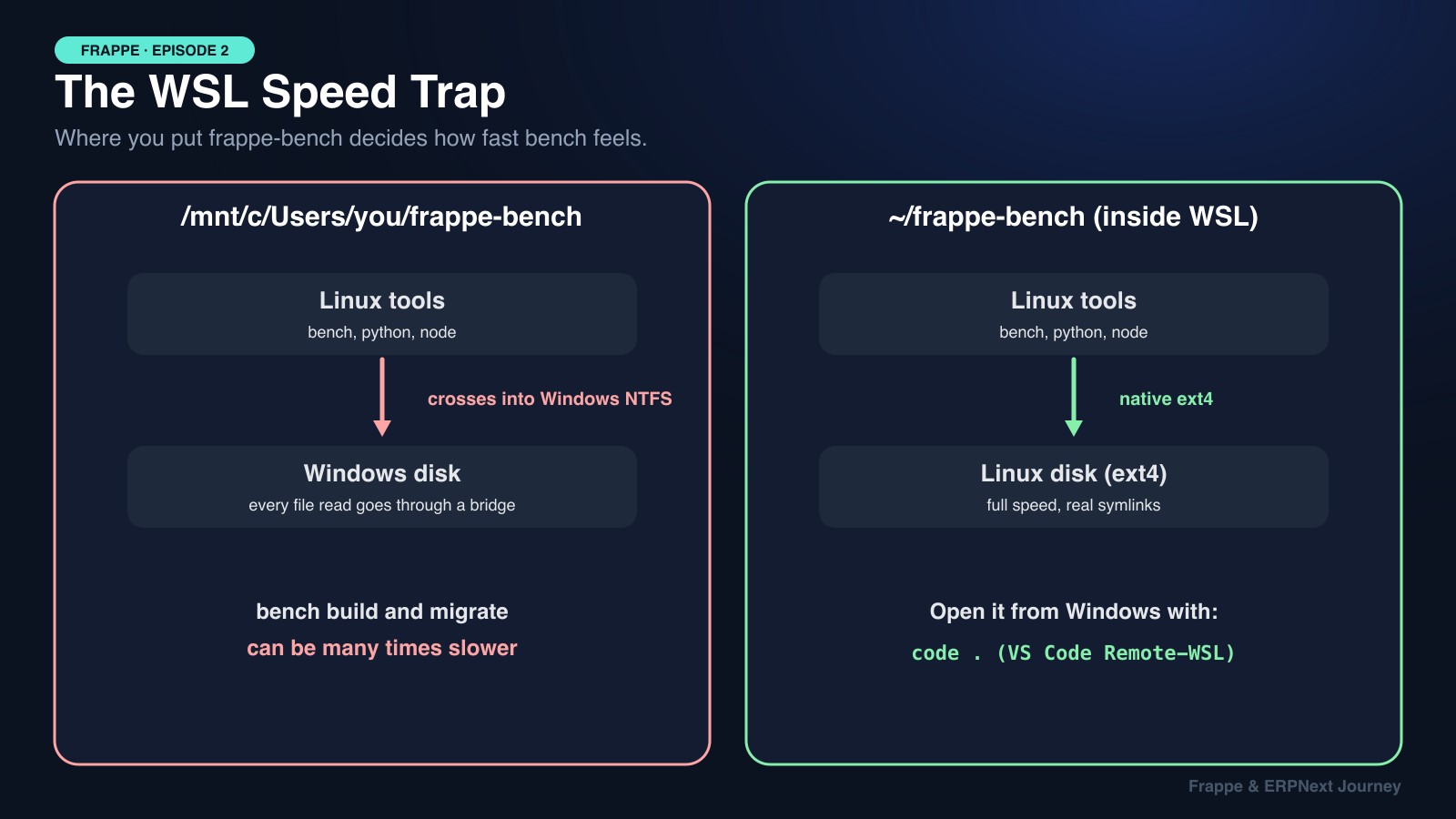
This one cost our team days. WSL can see your Windows drive at /mnt/c/..., so it's tempting to put frappe-bench there. Don't. Every file read crosses a bridge between Linux and Windows' NTFS, and Frappe reads thousands of files. bench build and bench migrate become painfully slow, and symlinks can break.
Keep it in your Linux home folder (~/frappe-bench) and open it from Windows with:
cd ~/frappe-bench
code .     # VS Code opens with the Remote-WSL extension
🍕 Explain It Like You're 5
You have a toy train set that only fits on wooden tracks. Your friend's house only has plastic tracks.
You could try to force the train onto plastic tracks, but it keeps falling off. Instead, you bring a small piece of wooden track with you and put it on your friend's floor. Now the train runs perfectly!
Frappe is the train, Ubuntu is the wooden track, and WSL2 or Docker is the piece of track you bring to a Windows house.
🎯 Debugging Cheat Sheet
| Error you see | Why it happens | Fix |
|---|---|---|
module 'os' has no attribute 'fork' | Running workers on native Windows | Use WSL2 or Docker |
/usr/bin/env: 'bash\r': No such file or directory | Windows CRLF line endings from git | git config --global core.autocrlf input, then re-clone |
error: externally-managed-environment | Ubuntu 23.04+ blocks system pip | uv tool install frappe-bench |
bench: command not found | uv's tool folder isn't on PATH | uv tool update-shell, then open a new terminal |
Access denied for user 'root'@'localhost' on new-site | MariaDB root uses socket auth, no password set | Run sudo mariadb-secure-installation and set one |
bench build takes forever in WSL | Bench lives on /mnt/c | Move it to ~/frappe-bench |
| Port 8000 already in use | Another bench start still running | lsof -i :8000, stop the old process |
| PDF printing fails | Chromium not downloaded yet (v16) | bench setup-chrome |
Key Takeaways for Interviews
- "Use Ubuntu" has real technical reasons: Gunicorn and Supervisor are Unix tools, RQ workers need
fork(), Redis targets Linux, and bench assumes a Unix shell. fork()matters most: Without it, background jobs and scheduled tasks can't run at all.- Windows developers have good options: WSL2 for daily work, frappe_docker for quick or team setups, a VM as a fallback.
- Dev/prod parity: Developing on the same OS as production removes a whole class of bugs.
📚 Official Sources
Everything here is checked against Frappe's own documentation and blog:
- Installation guide (v16 requirements, uv, WSL note)
- frappe_docker (official Docker setup)
- Production Setup
- RQ documentation (workers and fork)
Next episode, we leave the terminal and look at the business side: the ERPNext map, showing how Selling, Buying, Stock, Manufacturing, Accounts and HR connect.