Every spinning mill has the same layout, even if the buildings look different: a raw material store, the production floor, a finished goods warehouse, and an office with the record books. Once you know the layout, you can walk into any mill and find what you need.
frappe-bench/ is the same. Every Frappe server in the world has the same folder layout. Learn it once, and you can SSH into any ERPNext server and know exactly where the code, the data, the configs and the logs are.
Keywords
- Bench: Both the CLI tool and the folder that holds everything (
frappe-bench/). - App: A Python package with DocTypes and code:
frappe,erpnext,hrms, or your own custom app. - Site: One running ERPNext instance with its own database, files and config.
- Multi-tenancy: One set of code serving many sites (tenants), each with separate data.
site_config.json: One site's settings (database name, password, flags).common_site_config.json: Settings shared by every site on the bench.encryption_key: The key Frappe uses to encrypt stored passwords. Lose it, and those passwords can't be decrypted.
Character Mapping
apps/: The machinery. Same machines for every customer.sites/: The customers' private warehouses, one per customer.site_config.json: The label on each warehouse door: which room, which key.common_site_config.json: The mill-wide rules posted at the main gate.config/,logs/,env/: The power room, the logbooks, and the tool shed.
1. The Tour
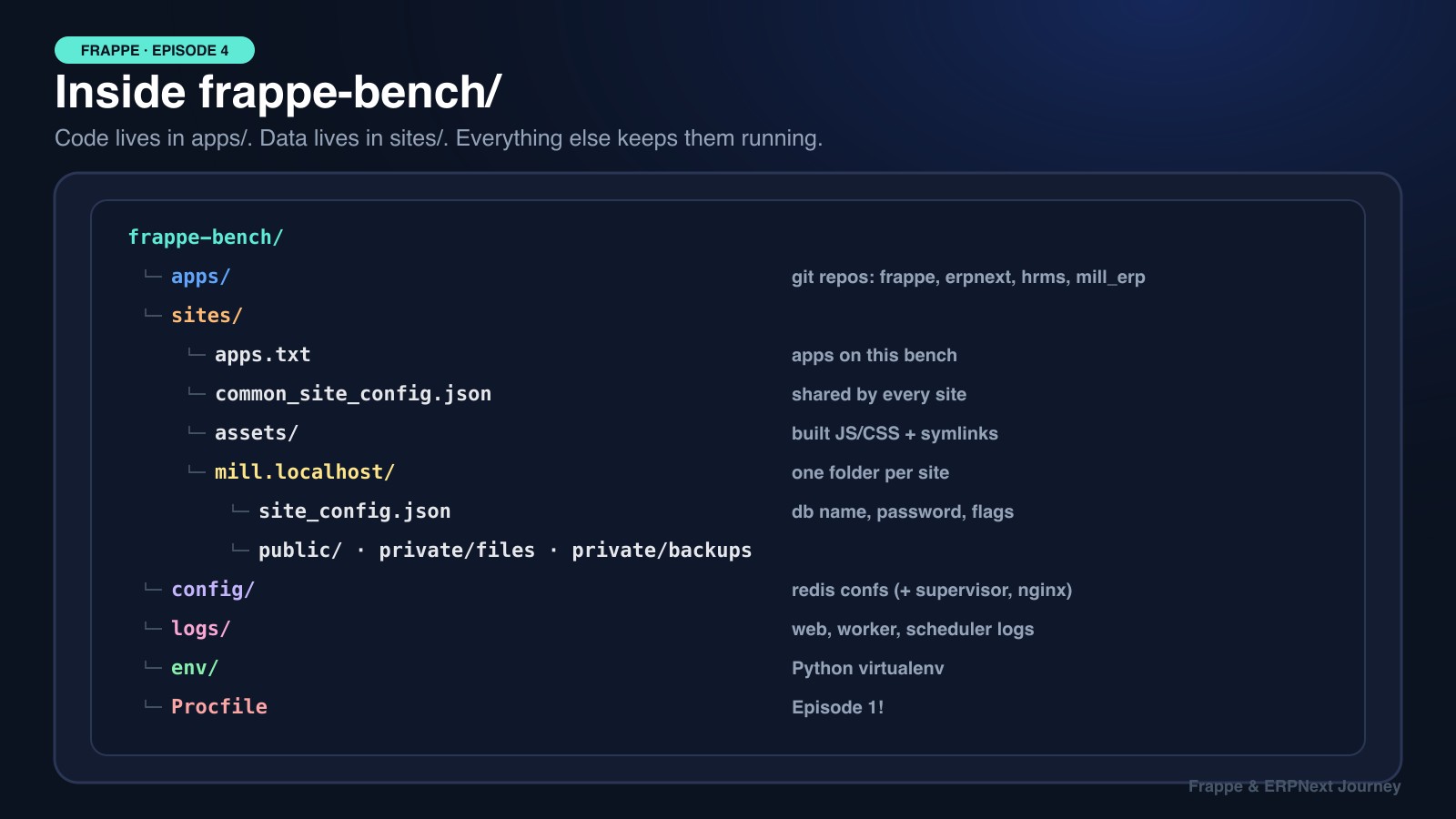
frappe-bench/
├── apps/                     # code (each one is a git repository)
│   ├── frappe/
│   ├── erpnext/
│   ├── hrms/
│   └── mill_erp/             # our custom app
├── sites/                    # data and per-site settings
│   ├── apps.txt              # apps available on this bench
│   ├── common_site_config.json
│   ├── assets/               # built JS/CSS (symlinks to each app's public/)
│   ├── mill.localhost/
│   │   ├── site_config.json
│   │   ├── public/files/     # uploaded files anyone can open
│   │   ├── private/files/    # uploaded files that need login
│   │   └── private/backups/  # bench backup writes here
│   └── test.localhost/
├── config/                   # redis_cache.conf, redis_queue.conf (+ supervisor.conf, nginx.conf in production)
├── logs/                     # worker.log, worker.error.log, scheduler.log, frappe.log ...
├── env/                      # Python virtualenv with every app's dependencies
└── Procfile # the 7 processes from Episode 1apps/: The Code
Every folder is a git repository. bench get-app erpnext clones ERPNext here and installs its Python dependencies into env/. Your custom app lives here too.
⚠️ Never edit files inside
apps/frappeorapps/erpnext. The nextbench updatewill overwrite your changes, or the update will fail with conflicts. Put every customization in your own app. That's what Episodes 10, 12 and 14 of this series are about.
sites/: The Data
apps.txt lists the apps available on this bench. Which apps are installed on each site is stored inside that site's own database, so one site can have ERPNext + HRMS while another has only Frappe + a custom app. Check with:
bench --site mill.localhost list-appsconfig/, logs/, env/
config/: The Redis configs from Episode 1. In production,bench setup productionalso writessupervisor.confandnginx.confhere.logs/: The first place to look when a background job fails (worker.error.log).env/: A Python virtualenv. Bench always runs Python from here, never from your system Python.
2. One Bench, Many Sites
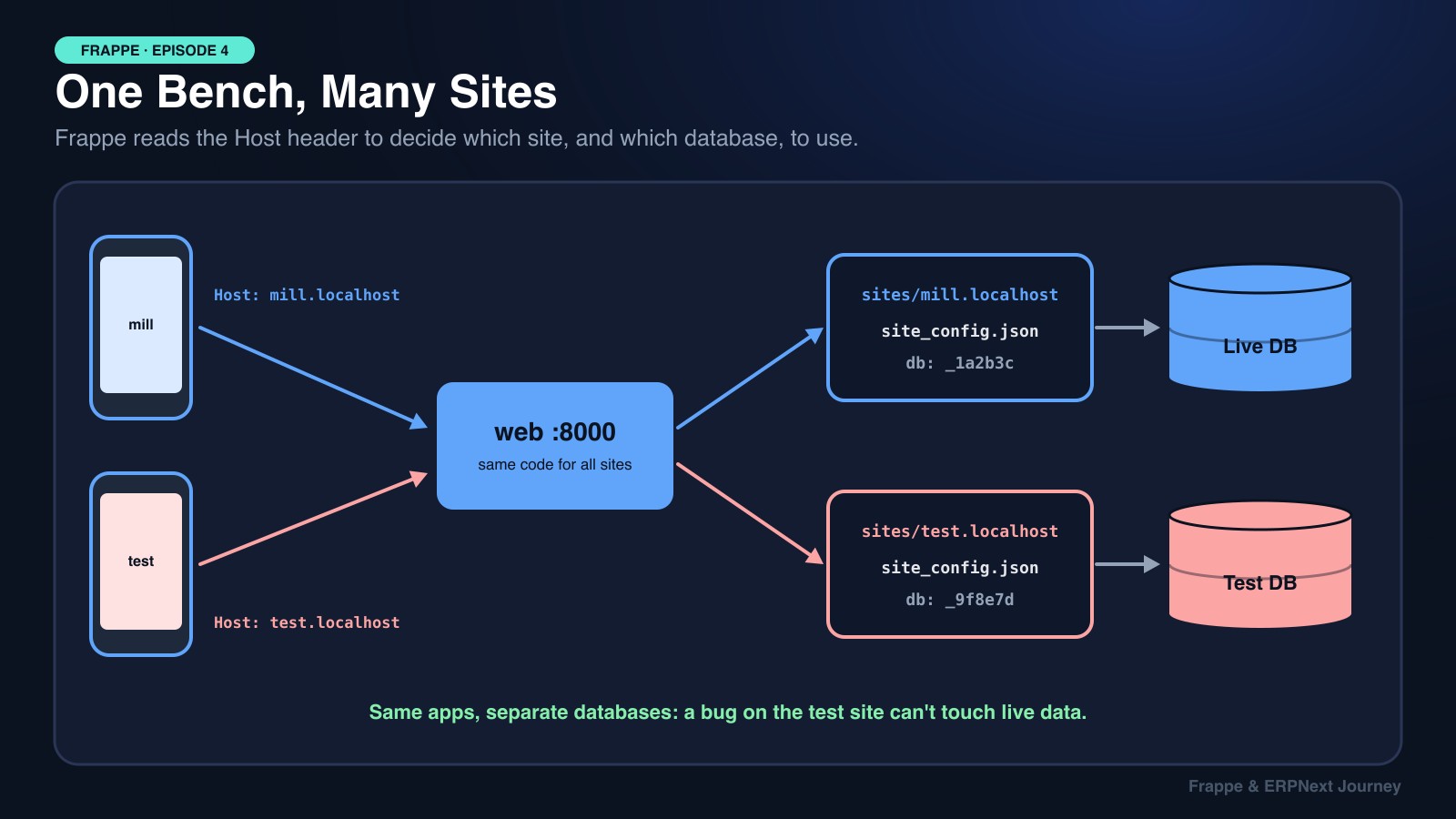
Here's the clever part. All sites on a bench share the same code in apps/ and the same running processes, but each site has its own database. So how does one web process know which site you want?
Step 1: Your browser requests http://mill.localhost:8000. The HTTP request carries a header: Host: mill.localhost.
Step 2: Frappe looks for a folder named sites/mill.localhost/.
Step 3: It reads that folder's site_config.json to get the database name and password.
Step 4: It connects to that database, and only that database, for the rest of the request.
*.localhost addresses point to your own machine in modern browsers. If one doesn't, run bench --site mill.localhost add-to-hosts. In production, you'd turn on DNS-based multi-tenancy so mill.example.com and client2.example.com route to their own sites through NGINX:
bench config dns_multitenant on
bench setup nginx
sudo service nginx reload
That's the same idea as System Design Episode 1: DNS and Episode 5: Load Balancers: a name decides where the request goes. Giving each tenant its own database is like sharding by customer (Episode 11): a mistake on the test site can't touch live data.
3. Two Config Files, One Rule
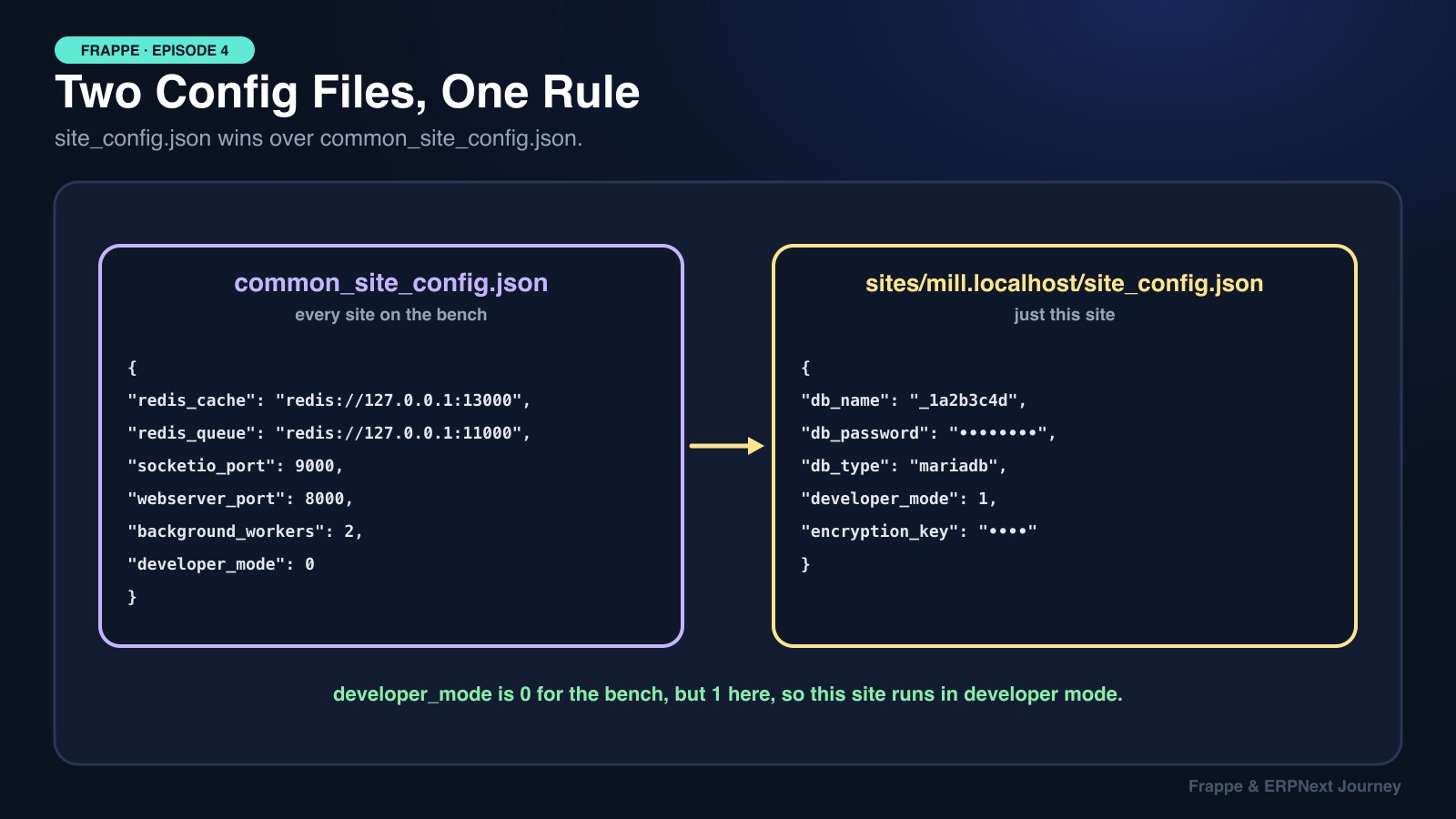
Frappe merges two JSON files for every site:
sites/common_site_config.json: shared settings like Redis URLs,socketio_port,webserver_portandbackground_workers.sites/<site>/site_config.json: that site's database credentials,encryption_key, and any site-specific flags.
The rule: if the same key is in both, the site's value wins. (Environment variables beat both.) That's how you can run one site in developer mode while the others don't. Use bench to edit them instead of hand-editing JSON:
bench --site mill.localhost set-config developer_mode 1   # this site only
bench config set-common-config -c background_workers 2  # every site (common_site_config.json)
bench --site mill.localhost show-config                   # see the merged result
In code, you read the merged config with frappe.conf:
if frappe.conf.developer_mode:
    frappe.log("Running in developer mode")
🔐
site_config.jsonholds the database password andencryption_key. Never commit it to git. And back up theencryption_keywith your database backups. If you restore a backup without it, every stored password (email accounts, API secrets, payment gateways) becomes unreadable.
4. Multi-Company or Multi-Site?
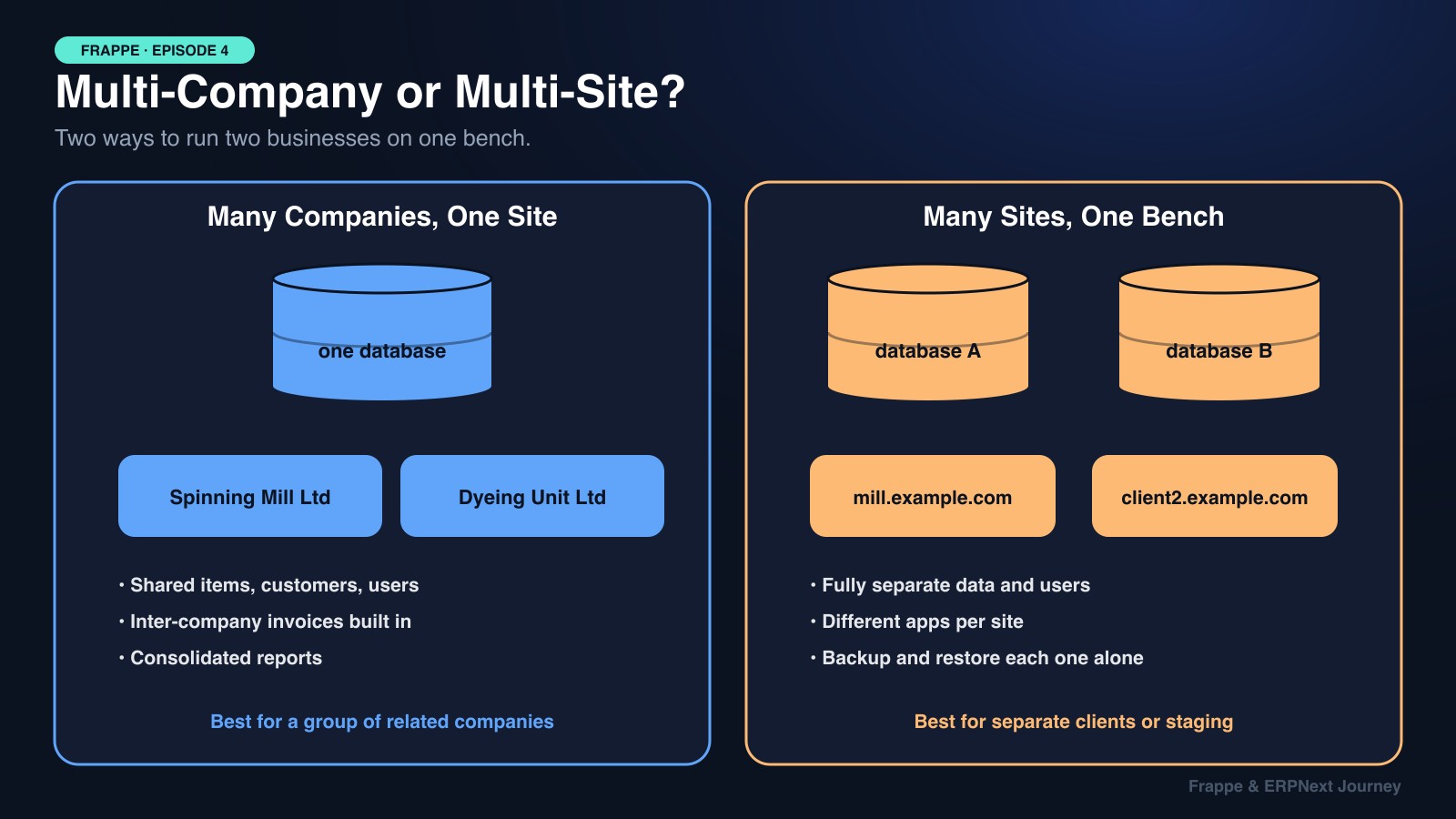
When the mill's owners opened a dyeing unit, the question came up straight away: new site, or new company?
| 🏢 Many Companies, One Site | 🌐 Many Sites, One Bench | |
|---|---|---|
| Database | One shared database | One database per site |
| Masters | Shared items, customers, suppliers | Completely separate |
| Users | Same login, restricted with User Permissions | Separate users per site |
| Inter-company | Built in (inter-company invoices, consolidated reports) | Needs integration |
| Backups | One backup covers everything | Back up and restore each separately |
| Choose when | Related companies in one group | Separate clients, or staging vs live |
We chose multi-company: same owners, shared cotton suppliers and yarn buyers, and management wanted one consolidated balance sheet. We still used a separate site for testing (test.localhost), restored from a live backup, so every new feature was tried on real data first.
Everyday Site Commands
bench new-site test.localhost                       # create a site + database
bench --site test.localhost install-app erpnext     # install an app on it
bench use mill.localhost                            # make it the default site
bench --site mill.localhost backup --with-files     # writes to sites/mill.localhost/private/backups
bench --site test.localhost restore <backup.sql.gz> # load that backup into test
bench --site all migrate                            # run patches on every site
bench --site mill.localhost console                 # Python shell inside the site
bench --site mill.localhost mariadb                 # SQL shell on the site's database
🍕 Explain It Like You're 5
Imagine one big toy box company that builds the same toy box for every family on your street.
Every family gets the same kind of box (the apps), but each family keeps their own toys inside (their database). The name on the box (the site name) tells you whose toys are inside.
That's a bench: one set of boxes, lots of families, and nobody mixes up the toys!
🎯 Debugging Cheat Sheet
| Symptom | Likely cause | Fix |
|---|---|---|
| "mill.localhost does not exist" | Folder name doesn't match the Host | Check sites/ folder names; use add-to-hosts |
Wrong site opens on localhost:8000 | Default site is a different one | bench use <site> |
My edit in apps/erpnext disappeared | bench update reset the repo | Move the change into a custom app |
| Developer mode not working | Set in the wrong config file | bench --site <site> show-config |
| Passwords broken after restore | encryption_key didn't come with the backup | Copy the original key into site_config.json |
| App missing on one site only | Installed on the bench, not on that site | bench --site <site> install-app <app> |
| Job failures with no error shown | Errors go to the logs | logs/worker.error.log, desk Error Log |
Key Takeaways for Interviews
- Code in
apps/, data insites/: one codebase, many sites, each with its own database. - The Host header picks the site: folder name →
site_config.json→ database. - Config layering:
site_config.jsonoverridescommon_site_config.json; read it withfrappe.conf. - Protect
site_config.json: it holds the DB password andencryption_key, so keep it out of git and back up the key. - Multi-company vs multi-site is a real design decision: shared data and consolidation vs full isolation.
📚 Official Sources
Everything here is checked against Frappe's own documentation and blog:
- Directory Structure
- Site Config (keys and precedence)
- Setup Multitenancy
- Backups
- Inter Company Invoices (ERPNext)
Next episode, we start the ERPNext module deep dives with Selling: Quotation to Sales Order to Delivery Note to Sales Invoice, and how we added Export LC tracking without breaking upgrades.