Imagine a tiny bakery on a busy morning. There is one cashier at the front and three bakers in the back kitchen.
If the cashier had to walk into the kitchen, wait for a baker to finish the cake, carry it back, and only then take the next customer's order, the line outside would stretch around the block. Customers would give up and leave.
So the bakery does something clever. The cashier writes every order on a little paper ticket and clips it to a metal ticket rail above the kitchen window. Then the cashier immediately turns to the next customer. The bakers grab tickets from the rail one by one, in order, whenever they're free.
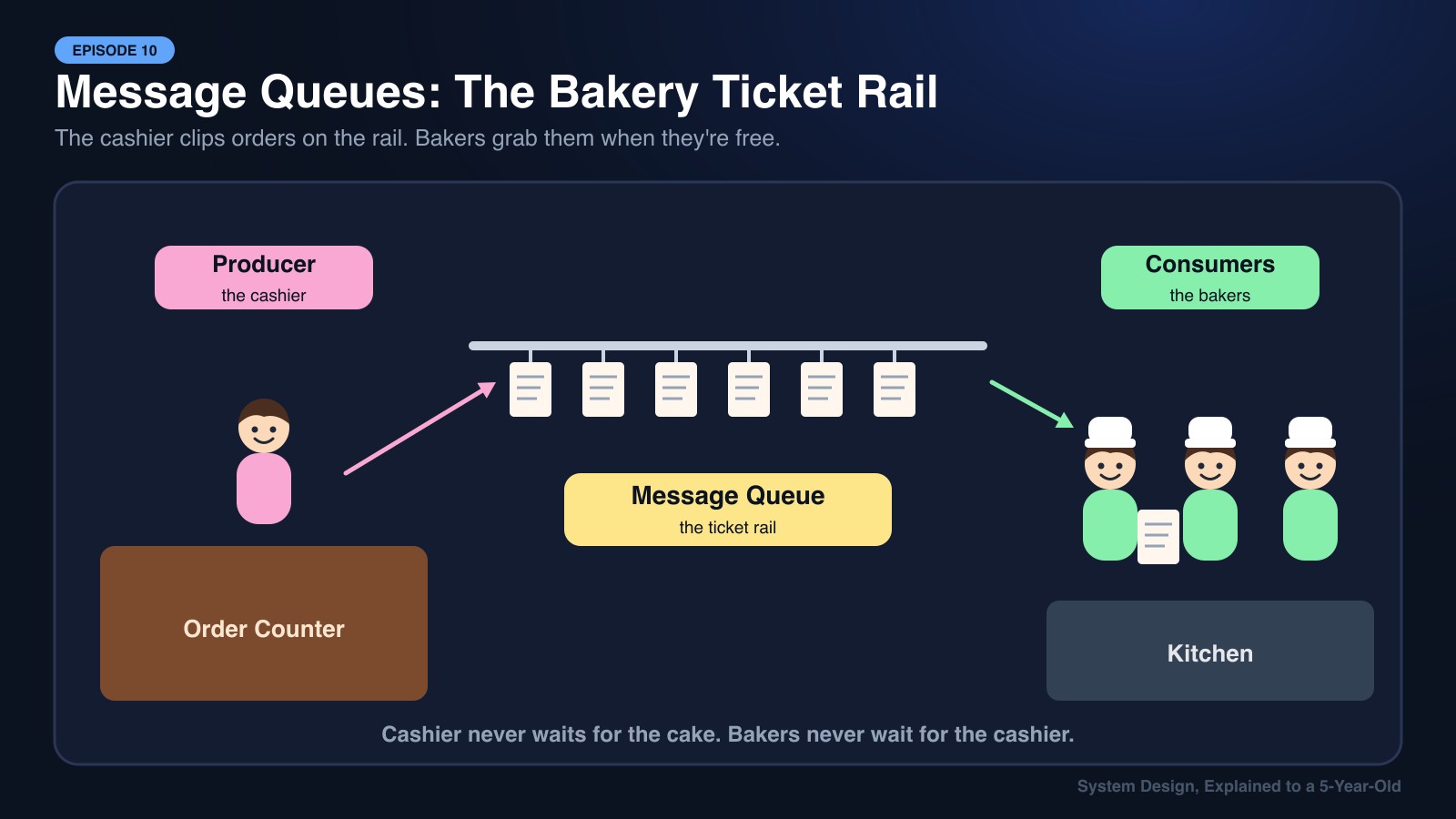
That ticket rail is a Message Queue. It lets one part of a system hand off work right now and lets another part finish that work a little later, without either side waiting on the other.
Keywords
- Message Queue: A buffer that holds messages (tasks or events) until a worker is ready to process them.
- Producer: The service that creates and sends messages into the queue.
- Consumer (Worker): The service that reads messages from the queue and does the actual work.
- Asynchronous Processing: Accepting a request now and finishing the slow work in the background later.
- Acknowledgement (ACK): A consumer telling the queue "I finished this message, you can delete it."
- Dead Letter Queue (DLQ): A separate holding area for messages that keep failing, so they don't block everything else.
- Pub/Sub (Publish/Subscribe): One message delivered to many different subscribers at once.
Character Mapping
- Producer (Order Service, Web Server): The Cashier writing tickets.
- Message Queue (Kafka, RabbitMQ, AWS SQS): The Metal Ticket Rail.
- Message: A single order ticket ("2 chocolate croissants, table 4").
- Consumers (Workers): The Bakers in the kitchen.
- Dead Letter Queue: The "Problem Orders" clipboard for tickets the bakers can't complete.
1. Why Not Just Do Everything Immediately?
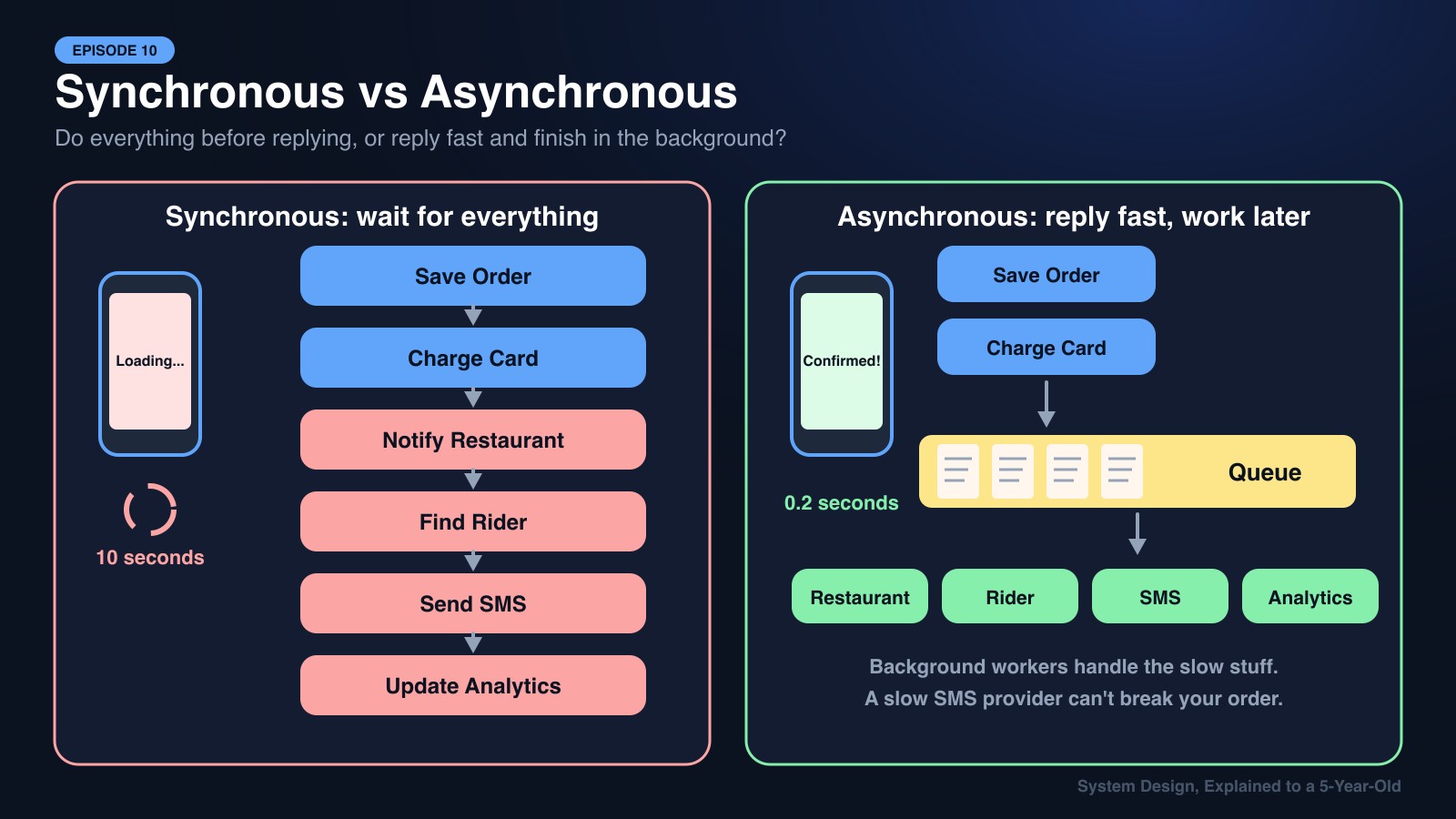
When you tap Place Order on a food delivery app, a lot has to happen:
- Save the order in the database
- Charge your card
- Notify the restaurant
- Find a nearby rider
- Send you a confirmation SMS and email
- Update analytics dashboards
If the server did all six steps one after another before answering your phone, you might stare at a loading spinner for 10 seconds. Worse, if the SMS provider is having a bad day, your whole order could fail just because a text message couldn't be sent.
With a message queue, the server does only the critical step (save the order and charge the card), drops a ticket on the rail saying ORDER_PLACED, and replies "Order confirmed!" in a fraction of a second. Everything else happens in the background.
2. How a Message Queue Works, Step by Step
Step 1: The Producer Sends a Message
The Order Service (cashier) writes a ticket: { "orderId": 9921, "event": "ORDER_PLACED" } and pushes it onto the queue.
Step 2: The Queue Holds It Safely The queue stores the message, usually on disk, so even if the power flickers, the ticket isn't lost.
Step 3: A Consumer Picks It Up A free worker (baker) pulls the next message off the rail and starts working on it.
Step 4: Acknowledge or Retry
- If the worker finishes successfully, it sends an ACK and the queue removes the ticket.
- If the worker crashes halfway, no ACK arrives. The queue puts the ticket back on the rail so another baker can try again.
Step 5: The Dead Letter Queue If the same ticket fails again and again (say, 5 times), it gets moved to the Dead Letter Queue. A developer can inspect it later, while the rest of the orders keep flowing normally.
3. Three Superpowers of a Message Queue
Superpower 1: Absorbing Traffic Spikes 🌊
At 1 PM, lunch orders flood in. Instead of crashing, the queue simply gets longer. Workers chew through it at a steady pace, like a dam holding back a flash flood and releasing it gently.
Superpower 2: Decoupling Services 🔌
The cashier doesn't need to know which baker will make the croissant, or even how many bakers are working today. Services only agree on the ticket format. You can add, remove, or rewrite workers without touching the producer.
Superpower 3: Fan-Out with Pub/Sub 📣
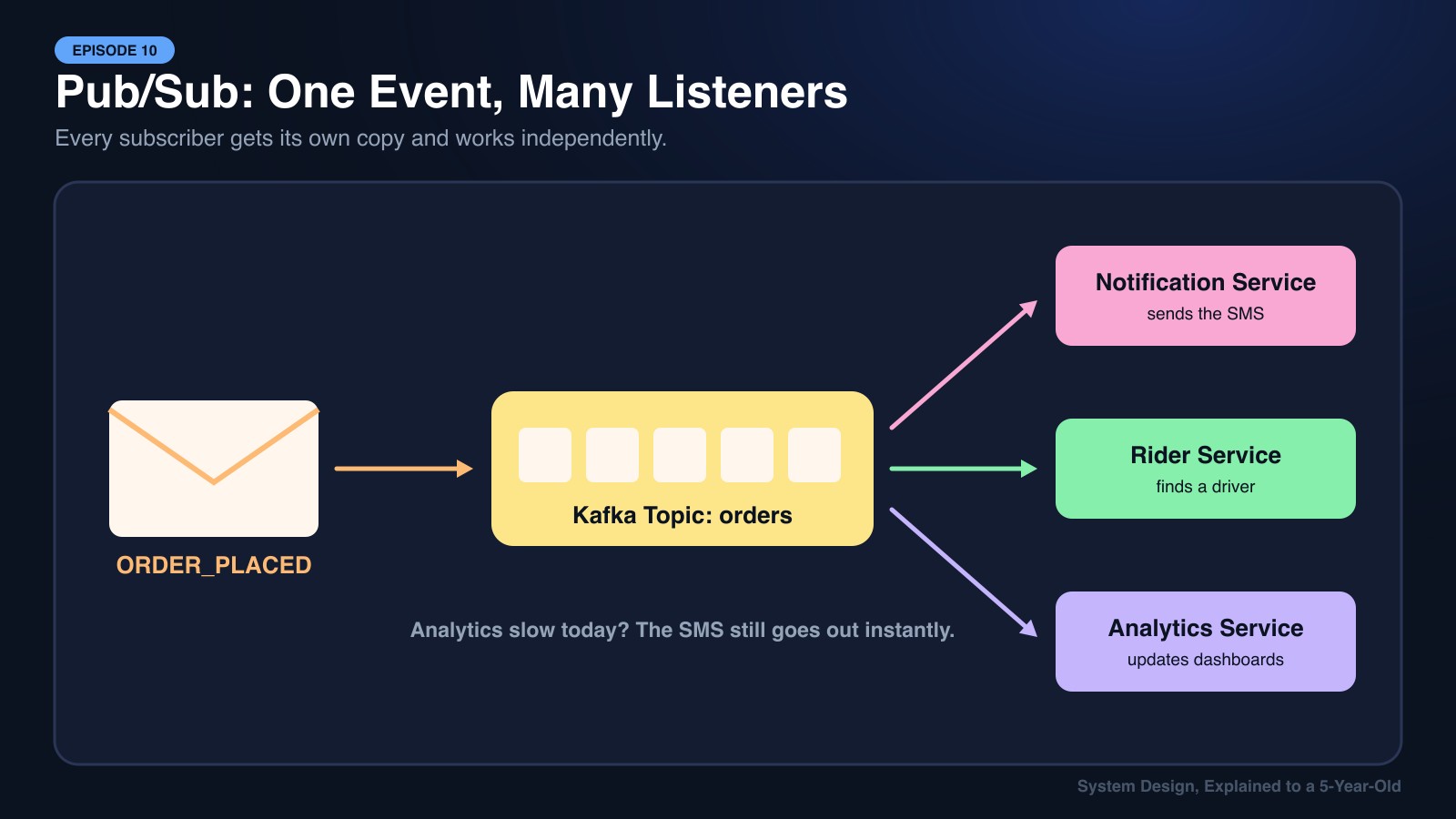
One ORDER_PLACED event can be delivered to many different teams at once:
- The Notification Service sends an SMS
- The Rider Service starts searching for a driver
- The Analytics Service updates the sales dashboard
Each one gets its own copy and works independently. If analytics is slow today, the SMS still goes out instantly.
4. Real-World Applications
- Foodpanda / Uber Eats: Placing an order publishes an event. Restaurant tablets, rider matching, push notifications, and loyalty points all react to it separately.
- Pathao / Uber: Millions of GPS pings from drivers stream through Kafka, where pricing, ETA, and fraud-detection services each read the same stream.
- bKash / Mobile Wallets: After a money transfer is committed, the SMS receipt and transaction history updates are queued, so a slow SMS gateway never blocks the payment itself.
- YouTube: When you upload a video, it lands in a queue. Workers then encode it into 144p, 360p, 720p, and 1080p in the background, which is why "Processing…" appears for a few minutes.
5. Kafka vs RabbitMQ: Two Popular Ticket Rails
| Feature | 🐇 RabbitMQ | 📜 Apache Kafka |
|---|---|---|
| Mental Model | A classic ticket rail: ticket is removed once done | A permanent logbook: entries stay, readers keep a bookmark |
| Best For | Task queues, background jobs, complex routing | High-volume event streams, logs, real-time analytics |
| Message After Reading | Deleted after ACK | Kept for days/weeks; can be replayed |
| Throughput | Tens of thousands of messages/sec | Millions of messages/sec |
| Ordering | Per queue | Per partition |
| Example Use | "Send this welcome email" | "Stream every GPS ping from every driver" |
Other common choices include AWS SQS (fully managed simple queue), Google Pub/Sub, and Redis Streams.
6. Gotchas Every Engineer Learns the Hard Way
- Messages can arrive twice. If a worker finishes but crashes before sending its ACK, the queue redelivers. Workers should be idempotent: processing the same ticket twice must not charge a customer twice.
- Order isn't always guaranteed. With many parallel workers, ticket #5 might finish before ticket #4. If order matters, route related messages to the same partition.
- Watch the queue length. A queue that keeps growing means consumers are too slow. Add more workers (horizontal scaling, just like Episode 5!).
🍕 Explain It Like You're 5
Imagine your mom has a list of chores on the fridge: "wash dishes," "feed the cat," "water plants."
She doesn't stand next to you waiting until each chore is done. She just sticks notes on the fridge and goes to work.
You and your brother grab one note at a time, do the chore, and throw the note away. If a chore is too hard, you put the note in a special "ask Mom" box. That fridge is a Message Queue!
🎯 The System Design Interview Summary
Whenever an interviewer describes something slow, unreliable, or spiky (sending emails, processing videos, generating reports, handling flash sales), reach for a message queue.
Key Takeaways for Senior Interviews:
- Respond fast, work later: Keep the user-facing request path short. Push non-critical work into a queue.
- Design for at-least-once delivery: Make consumers idempotent using unique message IDs.
- Always have a DLQ: Poison messages should never block the entire pipeline.
- Kafka for streams, RabbitMQ/SQS for tasks: Pick the tool based on whether you need replayable event history or simple job distribution.
- Monitor consumer lag: It's the number-one health signal for any queue-based system.
In the next episode, we'll look at what happens when a single database can't keep up: Replication and Sharding.