Welcome to a new series: System Design, Explained to a 5-Year-Old. Every episode takes one real system design question and turns it into a story simple enough for a five-year-old to follow, because if you can explain it that simply, you actually understand it.
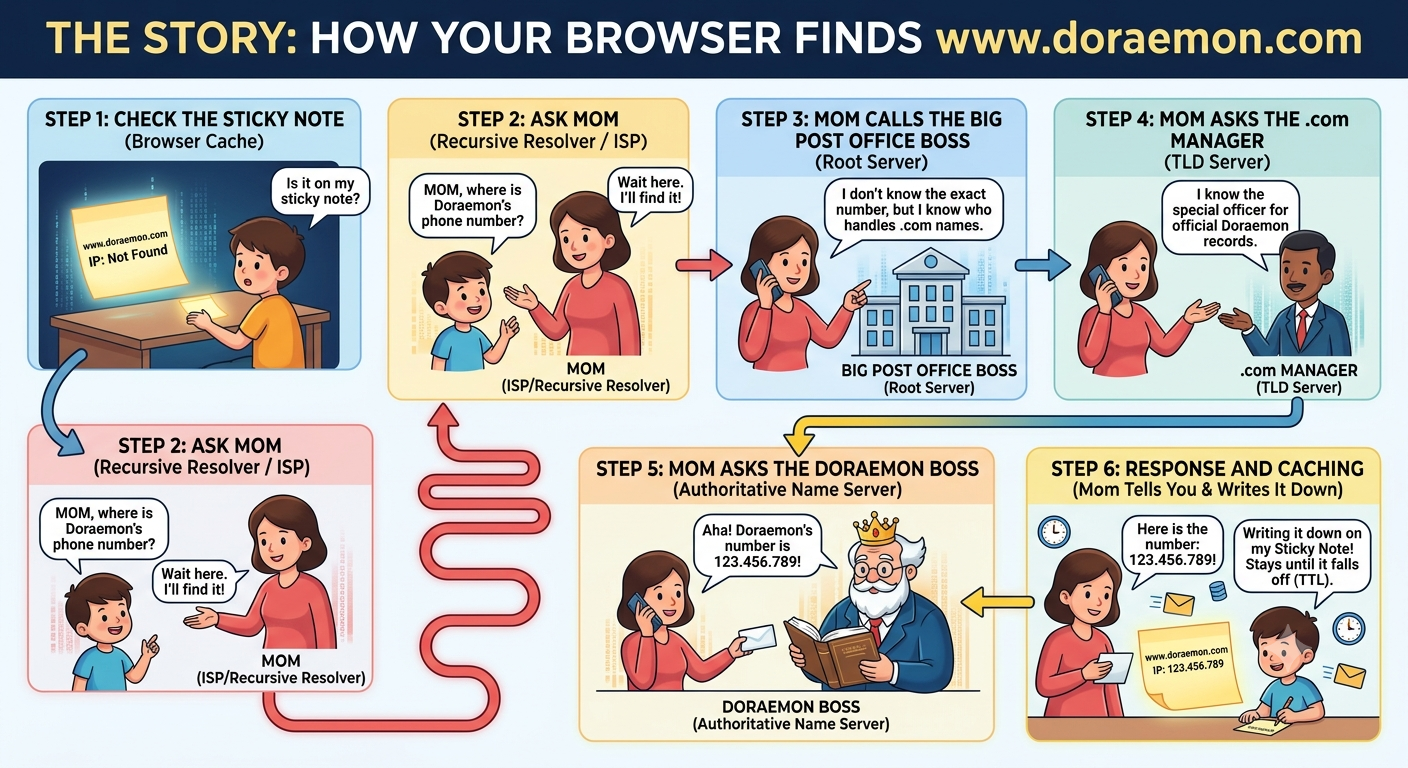
Keywords
- DNS: Domain Name System
- ISP: Internet Service Provider
- TLD: Top-Level Domain
- TTL: Time To Live
Character Mapping
- Sticky Note: Browser Cache
- Mom: Recursive Resolver (your ISP)
- Big Post Office Boss: Root Server
- .com Manager: TLD (Top-Level Domain) Server
- Doraemon Boss: Authoritative Name Server
Step 1: Check the Sticky Note (Browser Cache)
Right after you type the address, your browser checks your local Sticky Note (Browser Cache) to see if the number is already written on your desk from a previous visit. If it's not there, it moves to the next step.
Step 2: Ask Mom (Recursive Resolver / ISP)
Since it wasn't on your sticky note, you ask Mom (Recursive Resolver). Mom is the boss. She remembers everything for you! You ask her, "Mom, where is Doraemon's phone number?" If she doesn't know it off the top of her head, she says, "Wait here and finish your food. I promise I will go and find it out for you."
Step 3: Mom Calls the Big Post Office Boss (Root Server)
Mom calls the biggest post office boss in the whole world (Root Server). The Big Boss says, "I don't know Doraemon's exact number, but I know who is in charge of all names that end with .com. Go ask the manager!"
Step 4: Mom Asks the .com Manager (TLD Server)
Mom then calls the .com Manager (TLD Server). Mom asks, "Where is Doraemon?" The manager replies, "I don't know Doraemon's direct number, but I know the special officer who handles all official Doraemon records."
Step 5: Mom Asks the Doraemon Boss (Authoritative Name Server)
Finally, Mom calls the official Doraemon Boss (Authoritative Name Server). Mom asks, "Where is Doraemon's phone number?" The Doraemon Boss looks it up in their official directory and says, "Aha! Doraemon lives at the secret number 123.456.789!" Mom finally has the real IP address!
Step 6: Response and Caching (Mom Tells You & Writes It Down)
Mom brings the number back to you. You write it down on your Sticky Note (Browser Cache). The number stays on your desk until the sticky note falls off (TTL / Time To Live). As long as that sticky note is valid, you won't need to trouble Mom to look it up again!