Imagine walking into a massive supermarket on a weekend. There are 100 people carrying packed shopping carts, but only one single checkout register open. What happens? The line backs up out the door, people get angry, and the cashier gets overwhelmed and quits!
That's exactly what happens to a server when millions of users try to open an app at the same time. To stop servers from crashing, system designers use a Load Balancer.
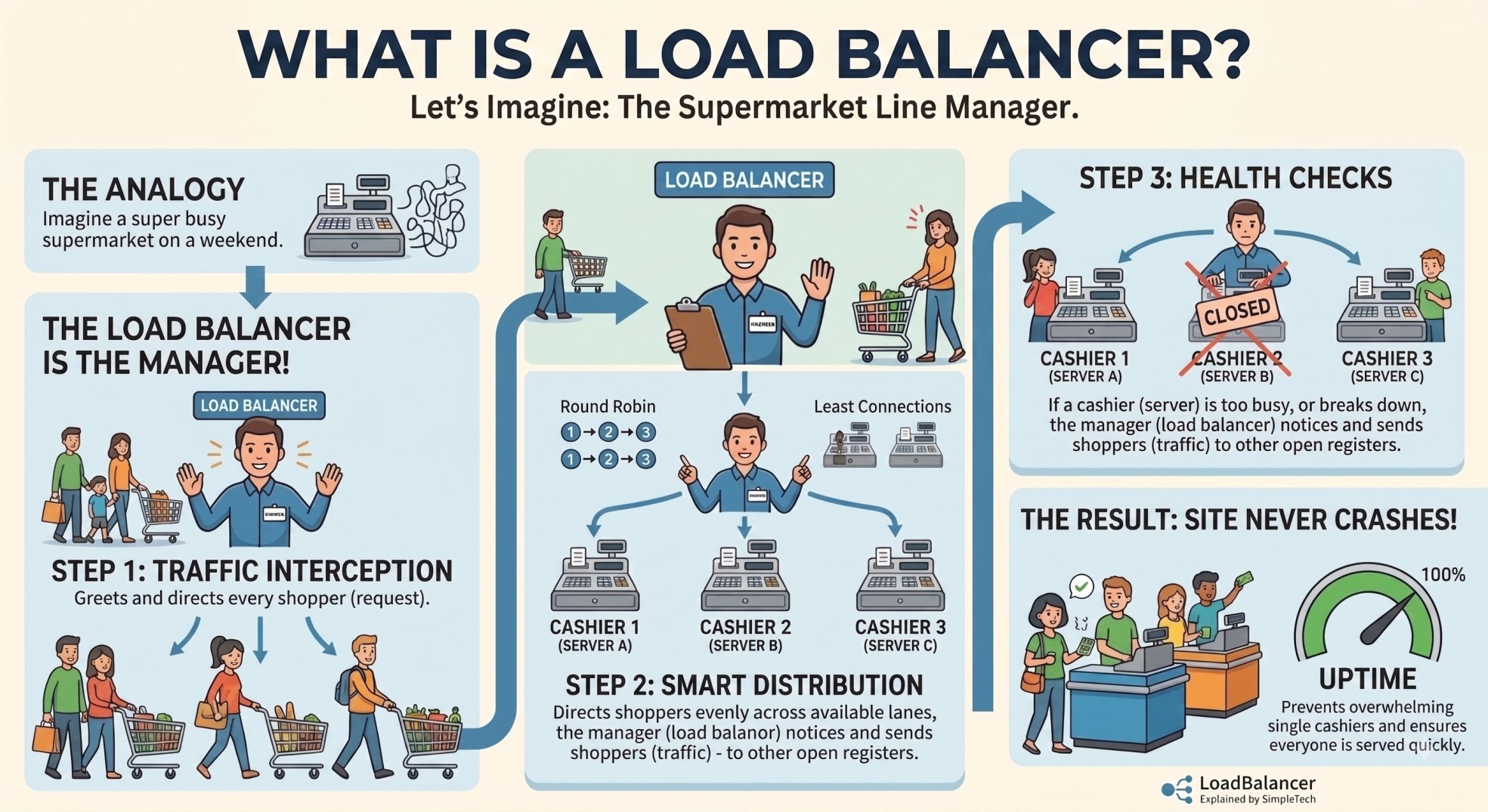
In this episode, we'll break down what a Load Balancer is, how load-balancing algorithms work, and the difference between Layer 4 and Layer 7 load balancing, using a simple real-world analogy.
Keywords
- Load Balancer: A traffic manager that distributes incoming requests across multiple backend servers.
- Horizontal Scaling: Adding more servers (cashiers) to handle heavy traffic instead of just buying a bigger computer.
- Round Robin: Passing requests down a line sequentially (Server 1 → Server 2 → Server 3).
- Least Connections: Sending traffic to whichever server is least busy.
- L4 vs L7 Load Balancing: Routing traffic based on pure network ports (L4) versus inspecting the actual URL content (L7).
Character Mapping
- Incoming Traffic (Requests): Shoppers with carts, waiting to pay.
- Backend Servers: Cashiers at checkout registers.
- Load Balancer: The smart supermarket line manager standing at the front, directing shoppers to open checkout lanes.
Real-World Applications
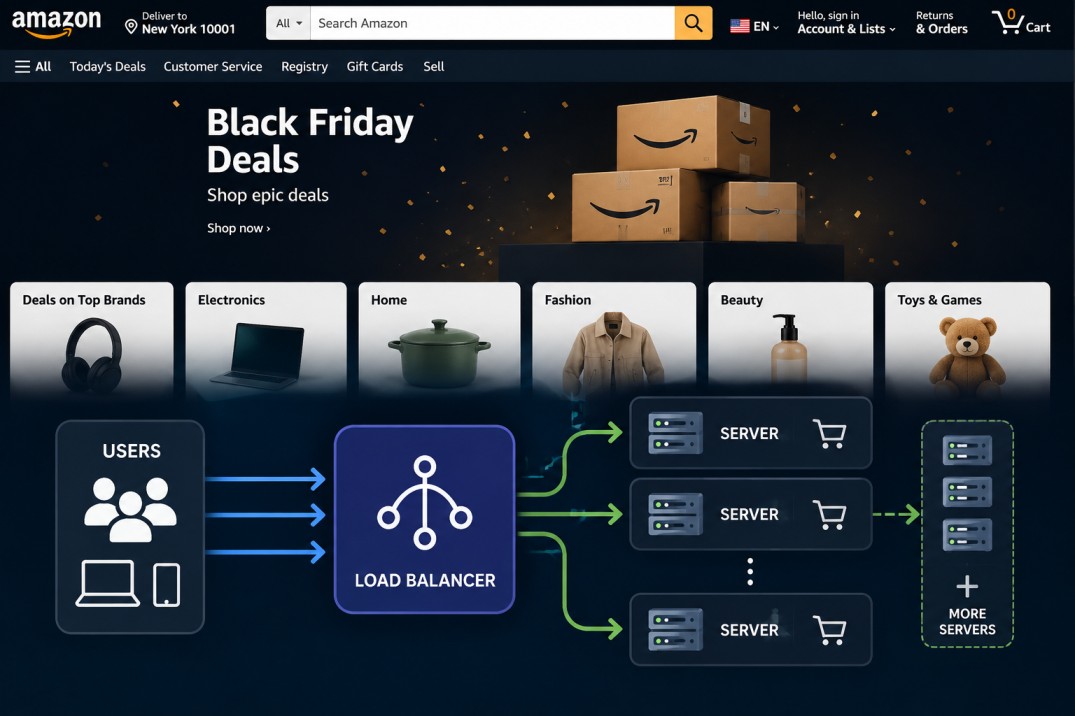
- Black Friday Sales (Amazon / Shopify): When millions buy items at midnight, load balancers spin up 1,000 extra cashier servers and spread the traffic instantly so the site never crashes. Millions of shoppers visit Amazon at the same time during Black Friday. The load balancer receives all these requests and distributes them across multiple servers. As traffic increases, more servers can be added to handle the extra load, keeping the website fast and preventing crashes.
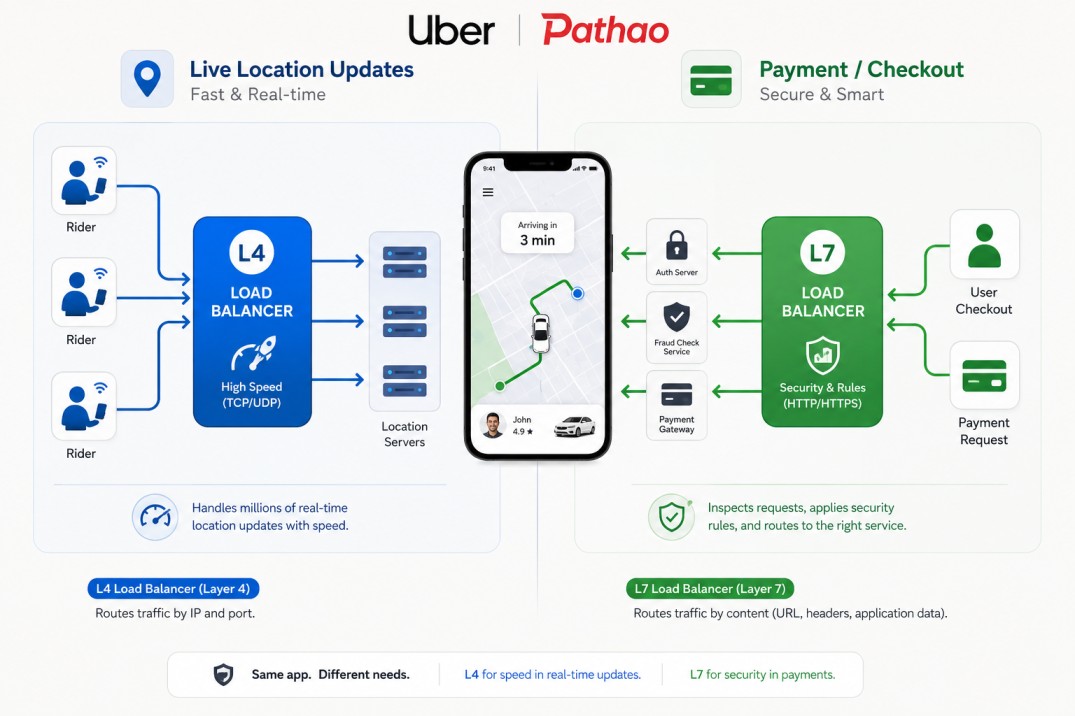
- Uber / Pathao: Routes location-tracking updates through L4 load balancers for speed, while routing credit card checkout requests through L7 load balancers for security checks. For live location updates, an L4 load balancer quickly distributes traffic to location servers. For payments, an L7 load balancer checks the request and routes it through security and payment services. This allows the same app to handle different types of traffic in the most suitable way.
How Does the Manager Decide?
While opening an app like Amazon or Uber, notice the phone doesn't connect directly to a database. It hits a Load Balancer first.
Step 1: Traffic Arrives Thousands of shoppers (client requests) arrive at the checkout area at once.
Step 2: The Manager Steps In Instead of letting everyone crowd around Cashier #1, the Line Manager (Load Balancer) greets each shopper at the entrance.
Step 3: Smart Traffic Distribution The Manager checks which cashiers (backend servers) are free and directs Shopper #1 to Register A, Shopper #2 to Register B, and Shopper #3 to Register C.
Step 4: Health Checks (Is a Cashier Asleep?) If Register B suddenly breaks down or runs out of receipt paper, the Line Manager notices immediately (a health check), stops sending shoppers to Register B, and redirects everyone to Registers A and C until Register B is fixed.
Layer 4 vs Layer 7: Basic vs Smart Line Managers
System engineers often talk about Layer 4 (L4) and Layer 7 (L7) load balancers. Here's the real difference:
Layer 4: The Fast, Blind Manager
The Manager doesn't open your shopping cart or care what you're buying. They only look at where you entered from (IP address & TCP port) and immediately point you to a register.
Layer 7: The Smart VIP Manager
The Manager stops you, opens your cart, and inspects what you're buying:
- Buying groceries? → Cashier A
- Buying electronics? → Cashier B
- Have a VIP Gold Card (a special HTTP header)? → Fast-Track Cashier!
Why use it? It allows super smart routing, e.g., sending /images requests to media servers and /payments requests to payment servers.