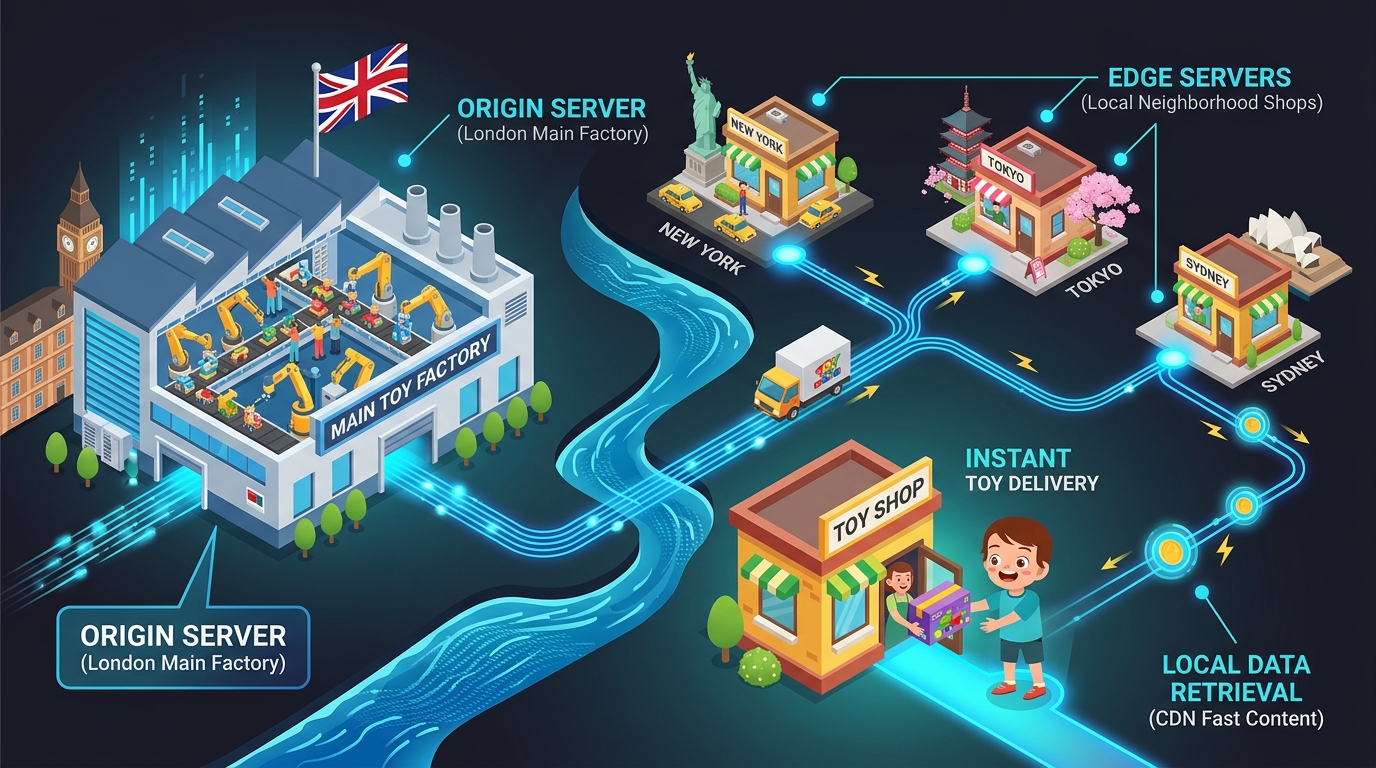
Imagine a kid living in Dhaka who wants a specific toy manufactured exclusively at a factory in London. If every order has to ship directly from London across oceans and continents, delivery takes days or weeks. But if the toy company opens a local neighborhood toy store right around the corner, picking up that toy takes just five minutes!
That is exactly how a Content Delivery Network (CDN) works. Instead of forcing every user across the world to fetch images, videos, and scripts from one central server far away, a CDN caches copies of those files in edge servers located close to everyone.
Keywords
- CDN (Content Delivery Network): A geographically distributed network of servers that caches static web content close to end users.
- Origin Server: The main central server (the factory) where the original website data, database, and business logic live.
- Edge Server / PoP (Point of Presence): The local caching server (the neighborhood toy store) situated close to users in their home cities.
- Latency: The physical time delay it takes for data packets to travel across the internet.
- Cache Hit vs Cache Miss: A hit means the requested file is already sitting in the local edge store; a miss means the edge store has to fetch it from the main factory first.
Character Mapping
- The Main Toy Factory in London: Origin Server (where all original web assets are built and stored).
- Local Neighborhood Toy Shops in Dhaka, New York, Tokyo: Edge Servers / PoPs (placed in cities all around the world).
- Popular Mass-Produced Toys: Static Assets (Images, Videos, CSS stylesheets, JavaScript bundles) that don't change often.
- Custom-Made Orders: Dynamic Requests (User Login, Account Settings, Checkout) that must be processed directly by the main factory.
1. How a CDN Works (Step-by-Step)
When someone opens a media-heavy website like Netflix, YouTube, or an e-commerce store, the browser fetches media through the nearest CDN edge node:
👤 User (Dhaka)
   |
   | 1. "Can I have the movie poster?"
   ↓
🏪 Local Edge Server (Dhaka)
   |
   |--- [Cache Hit] ---> Delivers poster in 10ms! ⚡
   |
   |--- [Cache Miss] ---> 🌐 Travels to Origin (London) 🛫
                            ↓
                          🏭 Origin Server
                            ↓
                          Saves copy in Dhaka & delivers!
Step 1: Requesting a File
A user in Dhaka clicks on a popular movie thumbnail or opens a product page.
Step 2: Checking the Neighborhood Store (Edge Server)
Instead of sending the network request across the ocean to the main Origin Server in London, the request automatically routes to the nearest local Edge Server in Dhaka.
Step 3: Cache Hit (Instant Delivery)
If the local Edge Server already has the movie poster saved from a previous visitor (Cache Hit), it delivers the file instantly in mere milliseconds.
Step 4: Cache Miss (Fetching from the Factory)
If the local Edge Server doesn't have the file yet (Cache Miss), it requests the file from the London Origin Server once, saves a copy locally on its shelf for future visitors, and hands it over to the user.
2. Pull CDN vs Push CDN: How Content Reaches the Store
There are two primary strategies for getting content from the main server onto CDN edge servers:
Pull CDN (Lazy):
User Requests Item ➔ Store empty? ➔ Fetch from Origin ➔ Cache for next time

Push CDN (Proactive):
Developer Uploads Item ➔ Origin immediately pushes copies to all worldwide Edge stores
Pull CDN (Lazy Loading)
- How it works: The local store remains empty until a visitor actually requests a file. On that first request, the edge node pulls the asset from the main factory, delivers it, and caches a copy on the shelf for all future visitors.
- Best used for: High-traffic websites, blogs, e-commerce stores, and frequently updated content.
Push CDN (Proactive Loading)
- How it works: Whenever the main factory manufactures a new product or releases a build, it immediately uploads and pushes copies to all local stores across the globe before any customer even asks for it.
- Best used for: Large software releases, mobile app updates, OS patches, and game installation downloads that rarely change.
3. What Belongs in a CDN (and What Doesn't)
Not everything can be stored in a neighborhood shop. Here is how system designers separate static assets from dynamic logic:
| ✅ Belongs on a CDN (Static Content) | ❌ Must Go to the Origin Server (Dynamic Content) |
|---|---|
| 🖼️ Website logos & profile avatars | 💳 Real-time credit card checkout processing |
| 🛍️ Product catalog images | 💰 Personal bank account balance inquiries |
| 🎬 Video stream chunks (Netflix / YouTube) | 🔑 User authentication & password verification |
| 🎨 CSS stylesheets & JavaScript bundles | 📍 Live ride-sharing driver GPS coordinates |
| 🔤 Web fonts & static marketing icons | 📝 Personalized user dashboard metrics |
4. Real-World Applications
Streaming Platforms (Netflix & YouTube)
High-definition 4K video files are distributed across thousands of local ISP edge servers. When you press play on a movie in Dhaka or Chicago, the video streams from a server 5 miles away from your house rather than streaming from California, preventing buffering wheels.
Global Breaking News
When a major news event breaks, millions of people load the exact same article at the exact same minute. Without a CDN, the central news server would crash instantly. With a CDN, 99% of requests are handled by edge servers without ever touching the origin database.
🍕 Explain It Like You're 5
If you want a pizza and the only chef lives in Italy, you have to wait 14 hours for an airplane to fly it to your doorstep.
A CDN is like having a Domino's pizza outlet right on your street. The master recipe comes from Italy (Origin Server), but your pizza gets baked and handed to you 5 minutes from your house (Edge Server).
🎯 The System Design Interview Summary
👤 Client
   ↓
🌐 CDN Edge Server (Fast Static Assets: Images, CSS, Video Chunks)
   ↓ (Dynamic requests only)
🛡️ Load Balancer
   ↓
🖥️ Application Server
   ↓
🗄️ Database
When designing scalable architectures, always place a CDN at the very front of your system to absorb high-bandwidth traffic, minimize latency, and protect backend application servers from unnecessary load.