Welcome to a new series: System Design, Explained to a 5-Year-Old. Every episode takes one real system design question and turns it into a story simple enough for a five-year-old to follow, because if you can explain it that simply, you actually understand it.
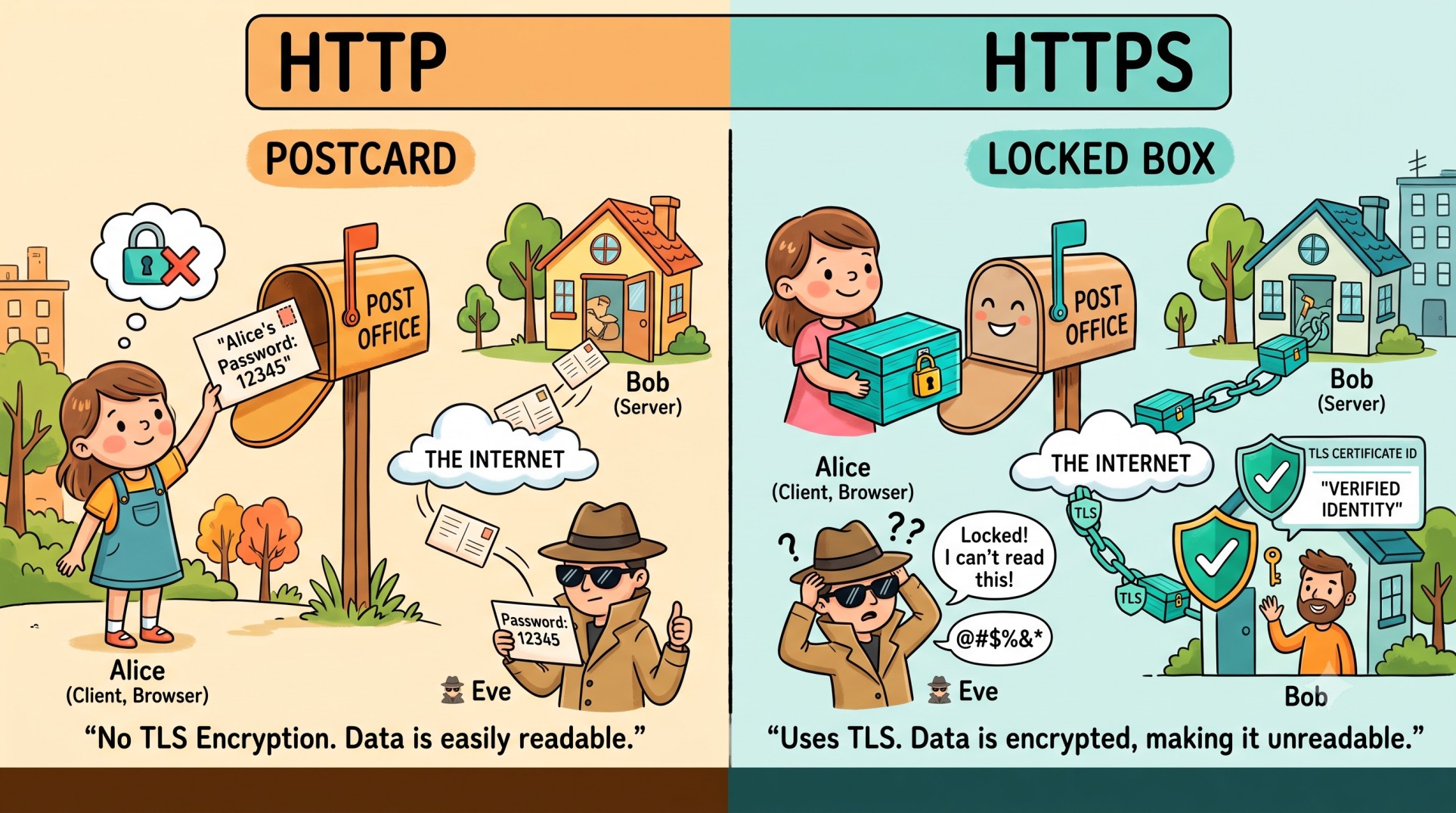
Keywords
- HTTP: HyperText Transfer Protocol
- HTTPS: HyperText Transfer Protocol Secure
- TLS: Transport Layer Security
- Client: Usually your browser
- Server: The computer that provides the website
- Encryption: Turning readable data into unreadable data
- Certificate: Helps verify that you're communicating with the real website
Character Mapping
- Alice: Your Browser / Client
- Bob's House: Web Server
- Postcard: HTTP
- Locked Box: HTTPS
- 🕵️ Eve: Someone trying to watch the communication
- Lock: Encryption
- ID Card: TLS Certificate
- Post Office: The Internet
Step 1: Alice Writes a Message (HTTP Request)
Alice wants to send a message to Bob. She writes:
"Bob, please give me the list of products."
That message is an HTTP request. Alice sends it through the post office (the Internet) to Bob's house (the server).
Alice 👧
   |
   | "Give me the products"
   ↓
🌐 Internet
   |
   ↓
Bob's Server 🏠
HTTP is just the set of rules Alice and Bob use to talk to each other.
Step 2: The Problem With a Postcard (HTTP)
Say Alice writes that message on a postcard instead of sealing it. It passes through a lot of hands on the way to Bob, and anyone along the route (like Eve 🕵️) can simply read it.
Username: alice
Password: 12345
Not exactly what you want a stranger reading.
HTTP is basically a postcard: it gets the message across, but nothing on it is encrypted.
Step 3: Alice Uses a Locked Box (HTTPS)
So instead, Alice puts the message in a locked box before sending it.
Alice 👧
   |
   | 🔐 Locked message
   ↓
🕵️ Eve
   |
   | "I can't read this!"
   ↓
Bob's Server 🏠
That's HTTPS in a nutshell: it uses TLS to protect the communication between browser and server.
HTTP
+
TLS
↓
HTTPS
Step 4: Bob Shows His ID Card (TLS Certificate)
There's still a problem, though: how does Alice know the person at Bob's house is actually Bob?
Someone could pretend:
"Hi Alice! I'm Bob!"
Alice says:
"Prove it!"
That's where the TLS certificate comes in: think of it as Bob's ID card.
Bob 🧑
   ↓
"Who are you?"
   ↓
🪪 TLS Certificate
   ↓
"I'm the real website!"
It's how the browser confirms it's actually talking to the real website before anything else happens.
Step 5: Alice and Bob Create a Secret Way to Talk
Once the browser trusts the certificate, it and the server agree on a set of keys only the two of them know, like Alice and Bob settling on their own private lock.
Alice 👧
   |
   | 🔑 Let's create a secure connection
   ↓
Bob 🏠
   |
   | 🔐 Secure connection established
   ↓
💬 Encrypted communication
From here on, everything they exchange is locked.
Step 6: The Real System Design Flow
Here's how it looks in a real system. Say you're building an online shopping site, and a user opens:
https://myshop.com/productsThe request travels through the system:
👤 User
   |
   | HTTPS 🔐
   ↓
🌐 Load Balancer
   |
   ↓
🖥️ Application Server
   |
   ↓
🗄️ Database
The browser sends something like:
GET /productsand the application server sends the product data back.
Browser
   |
   | GET /products
   ↓
Server
   |
   | Product data
   ↓
Browser
HTTPS just wraps that whole round trip in encryption.
HTTP vs HTTPS: Comparison Table
| HTTP | HTTPS |
|---|---|
| 📮 Postcard | 🔐 Locked box |
| No TLS encryption | Uses TLS |
| Port 80 | Port 443 |
| No TLS certificate | Uses TLS certificate |
| Communication is not protected by TLS | Communication is protected by TLS |
The easiest way to remember it:
HTTP = Communication
HTTPS = Secure Communication
Frequently Asked Questions (FAQ)
Is HTTPS just HTTP with SSL?
Basically, yes. HTTPS is HTTP running over TLS (the modern successor to SSL). The rules for requests and responses don't change, everything just travels through an encrypted, locked connection instead of an open postcard.
Do I need HTTPS if my site doesn't collect passwords?
Yes. Browsers flag plain HTTP sites as "Not Secure," it hurts your search ranking, and HTTPS protects everything a visitor sends, not just login forms, including cookies, form data, and even which pages they're browsing.
What port does HTTPS use?
HTTPS uses port 443 by default. HTTP uses port 80.
Is HTTPS slower than HTTP?
There's a tiny bit of extra work upfront to agree on encryption keys (the TLS handshake), but on modern hardware it's milliseconds, not something a visitor notices. Most of the web runs on HTTPS today without any perceptible slowdown.
Can I get an HTTPS certificate for free?
Yes. Services like Let's Encrypt issue free TLS certificates, and most hosting providers (Vercel, Netlify, Cloudflare, etc.) set up HTTPS automatically.
🍕 Explain It Like You're 5
You're ordering pizza. With HTTP, it's a normal phone call:
📞
"Hello! I want one pizza."
With HTTPS, it's the same call over a secure line:
🔐📞
"Hello! I want one pizza."
HTTP and HTTPS aren't two different conversations. HTTPS is just HTTP with a lock added to it.
🎯 The One Thing to Remember
HTTP
↓
CommunicationHTTPS
↓
HTTP + TLS
↓
Secure CommunicationSo whenever you see:
🔒 https://think:
"My browser is talking to this site over a locked connection."
And in a system design interview, the flow to remember is:
👤 Client
   ↓
🔐 HTTPS
   ↓
🌐 Load Balancer
   ↓
🖥️ Application Server
   ↓
🗄️ Database
That one extra letter in HTTPS is doing a lot of work.