Imagine a big jar of candy at a birthday party. If there were no rules, the first greedy kid would grab both fists full, and everyone else would get nothing.
So the parent sets a simple rule: every kid gets 5 candy tokens. Each candy costs one token. Every minute, you get one new token back, but you can never hold more than 5.
Now nobody can empty the jar. Kids who take one candy now and then never notice the rule. Only the kid trying to grab 50 candies in a minute gets told, "Sorry, wait a bit!"
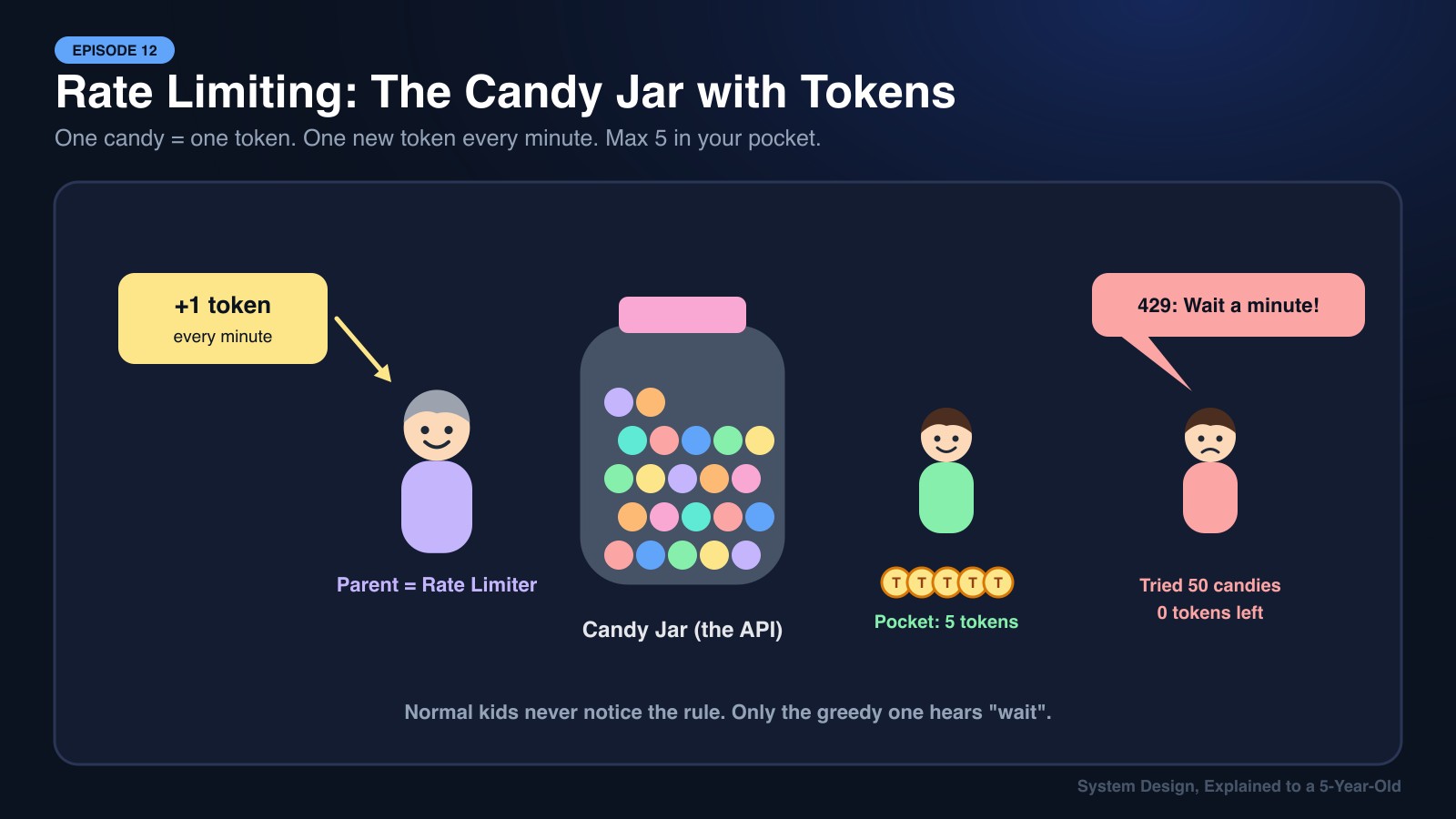
That rule is a Rate Limiter. In Episode 8, we saw the API Gateway's bouncer stopping bots. Today we open the bouncer's rulebook and see exactly how it counts.
Keywords
- Rate Limiting: Capping how many requests a client can make in a period of time.
- Throttling: Slowing down or rejecting requests once a limit is reached.
- HTTP 429 Too Many Requests: The standard response telling a client it has hit the limit.
- Token Bucket: A bucket of tokens that refills at a steady rate. Each request spends one token.
- Leaky Bucket: Requests drip out of a bucket at a fixed rate, no matter how fast they pour in.
- Fixed Window / Sliding Window: Counting requests per clock minute vs per rolling last-60-seconds.
- Distributed Rate Limiting: Sharing the counter across many servers, usually in Redis.
Character Mapping
- Client (App, Script, Bot): The kid wanting candy.
- Request: One piece of candy.
- Rate Limiter: The parent guarding the jar.
- Token: A candy ticket.
- Refill Rate: One new token every minute.
- Bucket Size: Max 5 tokens in your pocket.
- HTTP 429: "Sorry sweetie, come back in a minute."
1. Why Do We Need Rate Limiting?
- Stop Abuse: A bot trying 10,000 passwords per second on the login page.
- Prevent Accidental Floods: A buggy mobile app stuck in an infinite retry loop.
- Protect Costs: Calling an expensive SMS or AI API. Every request costs real money.
- Fairness: One heavy customer shouldn't slow down the app for everyone else.
- Business Tiers: Free plan = 100 requests/hour, Pro plan = 10,000 requests/hour.
2. The Four Classic Algorithms
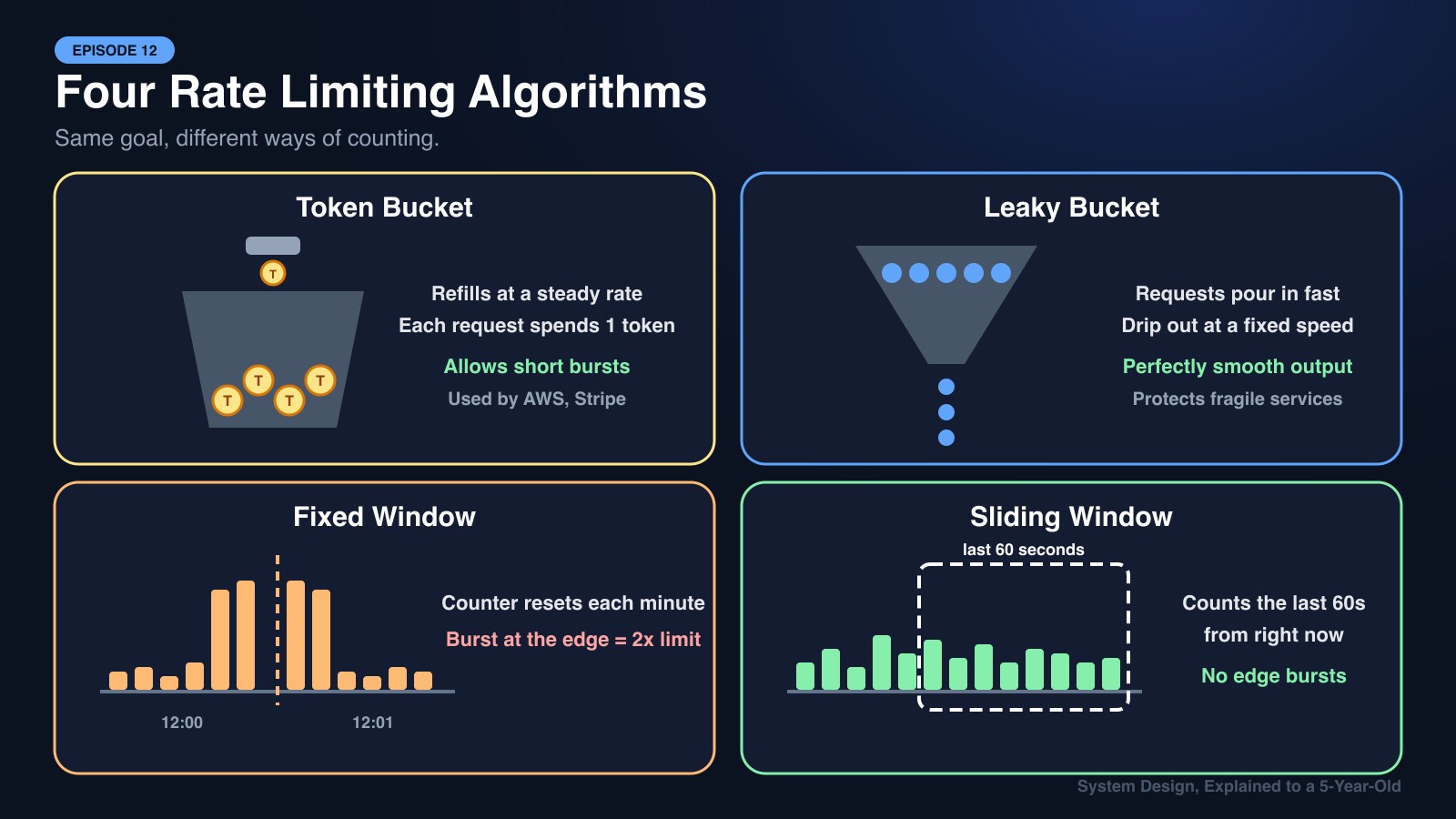
Algorithm 1: Token Bucket 🪙 (The Candy Jar)
- The bucket holds up to N tokens (e.g., 10).
- Tokens refill at a steady rate (e.g., 1 per second).
- Each request takes one token. No token? Rejected with
429.
Why people love it: It allows short bursts. If you haven't used the app for a while, you have a full bucket and can make 10 quick requests, which feels natural for real users. Used by AWS and Stripe.
Algorithm 2: Leaky Bucket 💧 (The Funnel)
- Requests pour into a bucket with a small hole at the bottom.
- They leak out (get processed) at a fixed, steady speed.
- If the bucket overflows, extra requests are dropped.
Why use it: Produces a perfectly smooth output rate. Great for protecting something fragile, like a payment processor that can only handle 50 transactions per second.
Algorithm 3: Fixed Window Counter 🕐
- Count requests per clock window: 12:00:00–12:00:59, 12:01:00–12:01:59.
- Limit = 100 per window. Counter resets when the minute flips.
The flaw: A sneaky client sends 100 requests at 12:00:59 and another 100 at 12:01:00. That's 200 requests in 2 seconds, while technically following the rules.
Algorithm 4: Sliding Window ⏩
- Instead of clock minutes, look at the last 60 seconds from right now.
- Sliding log keeps timestamps of every request (accurate but memory-hungry).
- Sliding window counter blends the current and previous window counts (accurate enough and cheap).
Why use it: Fixes the boundary-burst problem. A popular default for public APIs.
| Algorithm | Allows Bursts? | Memory | Accuracy | Best For |
|---|---|---|---|---|
| Token Bucket | ✅ Yes (up to bucket size) | Low | Good | General APIs |
| Leaky Bucket | ❌ No, smooth output | Low | Good | Protecting fragile services |
| Fixed Window | ⚠️ Double burst at edges | Very low | Weak | Simple internal limits |
| Sliding Window | ❌ Controlled | Medium | High | Public APIs, login protection |
3. What Do We Limit By?
The "who" matters as much as the "how many":
- Per User ID: Fair for logged-in users.
- Per IP Address: Useful before login, but many users can share one IP (a university Wi-Fi).
- Per API Key: Standard for developer platforms.
- Per Endpoint:
/logingets 5 per minute, while/productsgets 1,000 per minute.
4. Rate Limiting Across Many Servers (Redis to the Rescue)
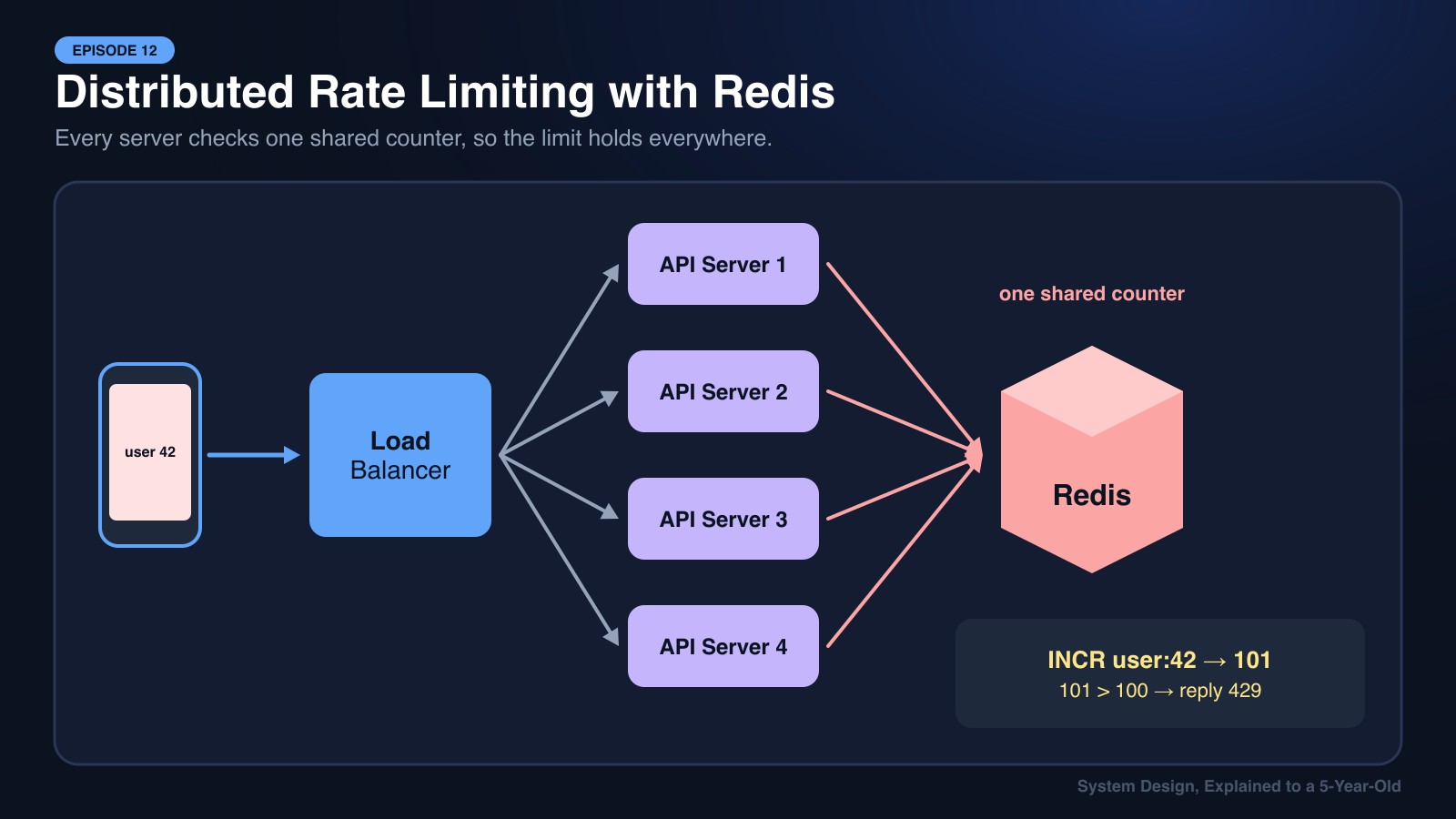
In Episode 5, we learned a load balancer spreads requests across many servers. But if each server keeps its own counter, a client could get 100 requests on each of 10 servers, 1,000 in total!
The fix: keep one shared counter in Redis (Episode 7):
Step 1: A request arrives at any server.
Step 2: The server runs INCR rate:user:42:minute:1201 in Redis and sets it to expire after 60 seconds.
Step 3: If the returned number is over the limit, respond 429. Otherwise, let it through.
Because Redis is in-memory and single-threaded per key, this check takes well under a millisecond and stays accurate across every server.
5. Being Polite: Telling Clients About the Limit
Good APIs return helpful headers so clients can slow down on their own:
HTTP/1.1 429 Too Many Requests
X-RateLimit-Limit: 100
X-RateLimit-Remaining: 0
Retry-After: 30
Well-behaved clients read Retry-After and wait, often with exponential backoff (wait 1s, then 2s, 4s, 8s…).
Real-World Applications
- bKash / Banking Apps: Lock PIN attempts after a few wrong tries to stop brute-force attacks.
- GitHub API: 5,000 requests per hour per authenticated user, with remaining counts in every response header.
- Twitter/X: Limits how many posts or DMs an account can send per day to slow down spam bots.
- OTP / SMS Login (Pathao, Foodpanda): Only a few "Resend code" taps per number per hour, which protects users and the SMS bill.
- OpenAI / AI APIs: Limits on both requests per minute and tokens per minute, based on your account tier.
🍕 Explain It Like You're 5
At the playground there's one big slide. The teacher says: "Everyone gets 3 turns, then you go to the back of the line and wait."
That way, one kid can't hog the slide all day, and everyone gets a fair turn. The teacher counting turns is the Rate Limiter!
🎯 The System Design Interview Summary
"Design a Rate Limiter" is one of the most common system design interview questions. A strong answer covers:
- Where it lives: Usually at the API Gateway or as middleware, before requests touch business logic.
- Which algorithm: Token bucket for most APIs. Mention the fixed-window edge problem to show depth.
- Shared state: A Redis cluster with atomic operations (
INCR+EXPIRE, or a Lua script) so all servers agree. - Failure mode: If Redis is down, do you fail open (allow traffic, risk abuse) or fail closed (block traffic, risk outage)? Most consumer apps fail open.
- Client experience: Return
429withRetry-Afterheaders.
Next episode: when you add or remove a Redis node or a database shard, how do you avoid reshuffling everything? Enter Consistent Hashing.